React Native - Text
在本章中,我们将讨论 React Native 中的 Text 组件。
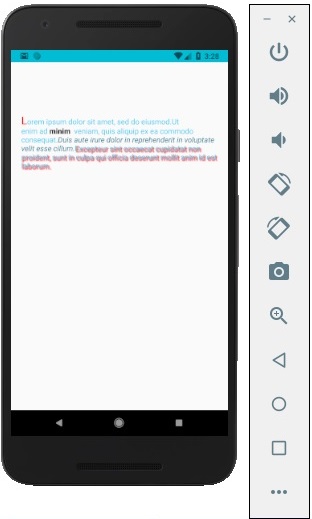
此组件可以嵌套,并且可以从父级到子级继承属性。这在很多方面都很有用。我们将向您展示将首字母大写、设置单词或文本部分样式等的示例。
步骤 1:创建文件
我们要创建的文件是 text_example.js
步骤 2:App.js
在此步骤中,我们将仅创建一个简单的容器。
App.js
import React, { Component } from 'react'
import TextExample from './text_example.js'

const App = () => {
   return (
      <TextExample/>
   )
}
export default App
步骤 3:文本
在此步骤中,我们将使用继承模式。styles.text 将应用于所有 Text 组件。
您还可以注意到我们如何将其他样式属性设置为文本的某些部分。重要的是要知道所有子元素都已将父样式传递给它们。
text_example.js
import React, { Component } from 'react';
import { View, Text, Image, StyleSheet } from 'react-native'

const TextExample = () => {
   return (
      <View style = {styles.container}>
         <Text style = {styles.text}>
            <Text style = {styles.capitalLetter}>
               L
            </Text>

            <Text>
               orem ipsum dolor sit amet, sed do eiusmod.
            </Text>

            <Text>
               Ut enim ad <Text style = {styles.wordBold}>minim </Text> veniam,
               quis aliquip ex ea commodo consequat.
            </Text>

            <Text style = {styles.italicText}>
               Duis aute irure dolor in reprehenderit in voluptate velit esse cillum.
            </Text>

            <Text style = {styles.textShadow}>
               Excepteur sint occaecat cupidatat non proident, sunt in culpa qui officia
               deserunt mollit anim id est laborum.
            </Text>
         </Text>

      </View>
   )
}
export default TextExample

const styles = StyleSheet.create ({
   container: {
      alignItems: 'center',
      marginTop: 100,
      padding: 20
   },
   text: {
      color: '#41cdf4',
   },
   capitalLetter: {
      color: 'red',
      fontSize: 20
   },
   wordBold: {
      fontWeight: 'bold',
      color: 'black'
   },
   italicText: {
      color: '#37859b',
      fontStyle: 'italic'
   },
   textShadow: {
      textShadowColor: 'red',
      textShadowOffset: { width: 2, height: 2 },
      textShadowRadius : 5
   }
})
您将收到以下输出 −