OpenCV - 绘制凸折线
您可以使用 imgproc 类的方法 fillconvexPoly() 在图像上绘制凸折线。以下是此方法的语法。
fillConvexPoly(Mat img, MatOfPoint points, Scalar color)
此方法接受以下参数 −
mat − 一个 Mat 对象,表示要在其上绘制凸折线的图像。
points − MatOfPoint 对象表示要在其间绘制凸折线的点。
scalar − 一个 Scalar 对象,表示凸折线的颜色。(BGR)
MatOfPoint 类的构造函数接受 Point 类的对象。
MatOfPoint(Point... a)
示例
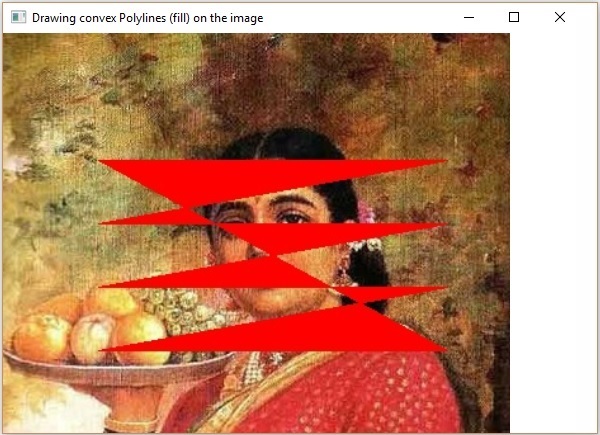
以下程序演示如何在图像上绘制凸折线并使用 JavaFX 窗口显示它。
import java.awt.image.BufferedImage;

import java.io.ByteArrayInputStream;
import java.io.InputStream;
import javax.imageio.ImageIO;

import javafx.application.Application;
import javafx.embed.swing.SwingFXUtils;
import javafx.scene.Group;
import javafx.scene.Scene;
import javafx.scene.image.ImageView;
import javafx.scene.image.WritableImage;
import javafx.stage.Stage;

import org.opencv.core.Core;
import org.opencv.core.Mat;
import org.opencv.core.MatOfByte;
import org.opencv.core.MatOfPoint;
import org.opencv.core.Point;
import org.opencv.core.Scalar;
import org.opencv.imgcodecs.Imgcodecs;
import org.opencv.imgproc.Imgproc;

public class FillConvexPoly extends Application {
   Mat matrix = null;

   @Override
   public void start(Stage stage) throws Exception {
        // 从相机捕获快照
        FillConvexPoly obj = new FillConvexPoly();
        WritableImage writableImage = obj.LoadImage();

        // 设置图像视图
        ImageView imageView = new ImageView(writableImage);

        // 设置图像视图的适合高度和宽度
        imageView.setFitHeight(600);
        imageView.setFitWidth(600);

        // 设置图像视图的保留比例
        imageView.setPreserveRatio(true);

        // 创建 Group 对象
        Group root = new Group(imageView);

        // 创建场景对象
        Scene scene = new Scene(root, 600, 400);

        // 设置舞台标题
        stage.setTitle("在图像上绘制凸折线(填充)");

        // 将场景添加到舞台
        stage.setScene(scene);

        // 显示舞台内容
        stage.show();
   }
   public WritableImage LoadImage() throws Exception {
      // 加载 OpenCV 核心库
      System.loadLibrary( Core.NATIVE_LIBRARY_NAME );

      // 从文件读取图像并将其存储到 Matrix 对象中
      String file ="E:/OpenCV/chap8/input.jpg";
      Mat matrix = Imgcodecs.imread(file);

      MatOfPoint matOfPoint = new MatOfPoint (
         new Point(75, 100), new Point(350, 100),
         new Point(75, 150), new Point(350, 150),
         new Point(75, 200), new Point(350, 200),
         new Point(75, 250), new Point(350, 250)
      );
      // 绘制折线
      Imgproc.fillConvexPoly (
         matrix,                       // Matrix obj of the image
         matOfPoint,                   // java.util.List<MatOfPoint> pts
         new Scalar(0, 0, 255)         // Scalar object for color
      );
      // 对图像进行编码
      MatOfByte matOfByte = new MatOfByte();
      Imgcodecs.imencode(".jpg", matrix, matOfByte);

      // 将编码的 Mat 存储在字节数组中
      byte[] byteArray = matOfByte.toArray();

      // 显示图像
      InputStream in = new ByteArrayInputStream(byteArray);
      BufferedImage bufImage = ImageIO.read(in);
      this.matrix = matrix;

      // 创建可写图像
      WritableImage writableImage = SwingFXUtils.toFXImage(bufImage, null);
      return writableImage;
   }
   public static void main(String args[]) {
      launch(args);
   }
}
执行上述程序后,你将获得以下输出 −