
ReactJS - 使用 React Hooks 的组件生命周期
React Hooks 提供了一个特殊的 Hook,useEffect(),用于在组件的生命周期中执行某些功能。useEffect() 将 componentDidMount、componentDidUpdate 和 componentWillUnmount 生命周期合并为一个 api。
useEffect() api 的签名如下 −
useEffect(
   <executeFn>,
   <values>
);
此处,
executeFn − 当效果发生时执行的函数,带有可选的返回函数。当需要清理时,将执行返回函数(类似于 componentWillUnmount)。
values − 效果所依赖的值数组。React Hooks 仅在值发生变化时执行 executeFn。这将减少对 executeFn 的不必要调用。
让我们在 react-clock-hook-app 应用程序中添加 useEffect()Hooks。
在您最喜欢的编辑器中打开 react-clock-hook-app。
接下来,打开 src/components/Clock.js 文件并开始编辑。
接下来,导入 useEffect api。
import React, { useState, useEffect } from 'react';
接下来,使用 setInterval 函数调用 useEffect 每秒设置日期和时间,并返回一个函数,使用 clearInterval 停止更新日期和时间。
useEffect(
   () => {
      let setTime = () => {
         console.log("setTime is called");
         setCurrentDateTime(new Date());
      }
      let interval = setInterval(setTime, 1000);
      return () => {
         clearInterval(interval);
      }
   },
   []
);
这里,
创建一个函数 setTime,将当前时间设置为组件的状态。
调用 setInterval JavaScript api 每秒执行 setTime,并将 setInterval 的引用存储在 interval 变量中。
创建一个返回函数,该函数通过传递 interval 引用 来调用 clearInterval api 以停止每秒执行 setTime。
现在,我们已经更新了 Clock 组件,该组件的完整源代码如下 −
import React, { useState, useEffect } from 'react';

function Clock() {
   const [currentDateTime, setCurrentDateTime] = useState(new Date());
   useEffect(
      () => {
         let setTime = () => {
            console.log("setTime is called");
            setCurrentDateTime(new Date());
         }
         let interval = setInterval(setTime, 1000);
         return () => {
            clearInterval(interval);
         }
      },
      []
   );
   return (
      <div>
         <p>The current time is {currentDateTime.toString()}</p>
      </div>
   );
}
export default Clock;
接下来,打开 index.js 并使用 setTimeout 在 5 秒后从 DOM 中删除时钟。
import React from 'react';
import ReactDOM from 'react-dom';
import Clock from './components/Clock';

ReactDOM.render(
   <React.StrictMode>
      <Clock />
   </React.StrictMode>,
   document.getElementById('root')
);
setTimeout(() => {
   ReactDOM.render(
      <React.StrictMode>
         <div><p>Clock is removed from the DOM.</p></div>
      </React.StrictMode>,
      document.getElementById('root')
   );
}, 5000);
接下来,使用 npm 命令为应用程序提供服务。
npm start
接下来,打开浏览器并在地址栏中输入 http://localhost:3000 并按回车键。
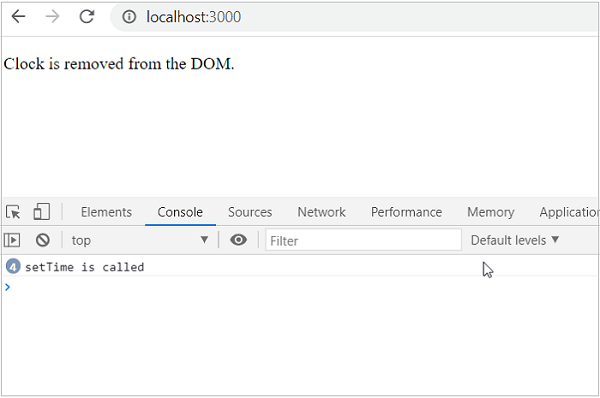
时钟将显示 5 秒,然后从 DOM 中删除。通过检查控制台日志,我们可以发现清理代码已正确执行。
React children 属性又名 Containment
React 允许将任意子用户界面内容包含在组件内。可以通过 this.props.children 访问组件的子项。在组件内添加子项称为 containment。 包含用于组件的某些部分本质上是动态的情况。
例如,富文本消息框可能直到被调用时才知道其内容。让我们创建 RichTextMessage 组件来展示本章中 React children 属性的功能。
首先,按照 创建 React 应用程序 一章中的说明,使用 Create React App 或 Rollup bundler 创建一个新的 React 应用程序 react-message-app。
接下来,在您最喜欢的编辑器中打开该应用程序。
接下来,在应用程序的根目录下创建 src 文件夹。
接下来,在 src 文件夹下创建 components 文件夹。
接下来,在 src/components 文件夹下创建一个文件 RichTextMessage.js 并开始编辑。
接下来,导入 React 库。
import React from 'react';
接下来,创建一个类 RichTextMessage 并使用 props 调用构造函数。
class RichTextMessage extends React.Component {
   constructor(props) {
      super(props);
   }
}
接下来,添加 render() 方法并显示组件及其子组件的用户界面
render() {
   return (
      <div>{this.props.children}</div>
   )
}
这里,
props.children 返回组件的子项。
将子项包装在 div 标签内。
最后,导出组件。
export default RichTextMessage;
下面给出了 RichTextMessage 组件的完整源代码 −
import React from 'react';

class RichTextMessage extends React.Component {
   constructor(props) {
      super(props);
   }
   render() {
      return (
         <div>{this.props.children}</div>
      )
   }
}
export default RichTextMessage;
接下来,在 src 文件夹下创建一个文件 index.js,并使用 RichTextMessage 组件。
import React from 'react';
import ReactDOM from 'react-dom';
import RichTextMessage from './components/RichTextMessage';

ReactDOM.render(
   <React.StrictMode>
      <RichTextMessage>
         <h1>Containment is really a cool feature.</h1>
      </RichTextMessage>
   </React.StrictMode>,
   document.getElementById('root')
);
最后,在根文件夹下创建public文件夹,并创建index.html文件。
<!DOCTYPE html>
<html lang="en">
   <head>
      <meta charset="utf-8">
      <title>React App</title>
   </head>
   <body>
      <div id="root"></div>
      <script type="text/JavaScript" src="./index.js"></script>
   </body>
</html>
接下来,使用 npm 命令为应用程序提供服务。
npm start
接下来,打开浏览器并在地址栏中输入 http://localhost:3000 并按 Enter。

浏览器发出包裹在 div 标签中的组件子项,如下所示 −
<div id="root">
   <div>
      <div>
         <h1>Containment is really a cool feature.</h1>
      </div>
   </div>
</div>
接下来,更改 index.js 中 RichTextMessage 组件的 child 属性。
import React from 'react';
import ReactDOM from 'react-dom';
import Clock from './components/Clock';

ReactDOM.render(
  <React.StrictMode>
         <RichTextMessage>
            <h1>Containment is really an excellent feature.</h1>
         </RichTextMessage>
   </React.StrictMode>,
   document.getElementById('root')
);
现在,浏览器更新组件的子内容并发出如下所示的内容 −
<div id="root">
    <div>
        <div>
            <h1>Containment is really an excellent feature.</h1>
        </div>
    </div>
</div>
简而言之,包含是将任意用户界面内容传递给组件的绝佳特性。

