
ReactJS - Map
JavaScript Array 数据类型提供了一系列易于使用的函数来操作数组及其值。 map() 就是这样一个函数,它接受一个转换函数,并通过应用转换函数转换给定数组中的每个项目来创建一个新数组,并返回新创建的数组。
map 函数的签名如下 −
array.map(function(item, index, items), thisValue)
这里,
currentValue 表示当前元素的值
index 表示当前元素的索引值
items 表示当前元素的数组
thisValue 是可选的 this值,可以在调用 map 函数时传递
假设我们有一个数字列表,并且想要将数组中的每个值加倍。我们可以使用 map 函数在一行中完成此操作,如下所示 −
var numbers = [2, 4, 6]
var formed = numbers.map((val) => val + val)
for(var item of formed) { console.log(item) }
此处,输出将如下所示 −
4
8
12
示例
让我们使用 create-react-app 创建一个新应用程序并启动该应用程序。
create-react-app myapp
cd myapp
npm start
接下来,创建一个组件,组件文件夹下的 ExpenseListUsingForLoop (src/components/ExpenseListUsingForLoop.js)。
import React from 'react'
class ExpenseListUsingForLoop extends React.Component {
   render() {
      return <table>
         <thead>
            <tr>
               <th>Item</th>
               <th>Amount</th>
            </tr>
         </thead>
         <tbody>
         </tbody>
         <tfoot>
            <tr>
               <th>Sum</th>
               <th></th>
            </tr>
         </tfoot>
      </table>
   }
}
export default ExpenseListUsingForLoop
在这里,我们创建了一个带有页眉和页脚的基本表格结构。
接下来,创建一个函数来查找总费用金额。我们稍后会在 render 方法中使用它。
getTotalExpenses() {
   var items = this.props['expenses'];
   var total = 0;
   for(let i = 0; i < items.length; i++) {
      total += parseInt(items[i]);
   }
   return total;
}
这里,getTotalExpenses 循环遍历费用 props,并汇总总费用。
接下来,在 render 方法中添加费用项目和总金额。
render() {
   var items = this.props['expenses'];
   var expenses = []
   expenses = items.map((item, idx) => <tr><td>item {idx + 1}</td><td>{item}</td></tr>)
   var total = this.getTotalExpenses();
   return <table>
      <thead>
         <tr>
            <th>Item</th>
            <th>Amount</th>
         </tr>
      </thead>
      <tbody>
         {expenses}
      </tbody>
      <tfoot>
         <tr>
            <th>Sum</th>
            <th>{total}</th>
         </tr>
      </tfoot>
   </table>
}
这里我们有,
使用 map 函数导航费用数组中的每个项目,使用 transform 函数为每个条目创建表行 (tr),最后在 expenses 变量中设置返回的数组。
在 JSX 表达式中使用 expenses 数组来包含生成的行。
使用 getTotalExpenses 方法查找总费用金额并将其添加到 render 方法中。
ExpenseListUsingForLoop 组件的完整源代码如下 −
import React from 'react'
class ExpenseListUsingForLoop extends React.Component {
   getTotalExpenses() {
      var items = this.props['expenses'];
      var total = 0;
      for(let i = 0; i < items.length; i++) {
         total += parseInt(items[i]);
      }
      return total;
   }
   render() {
      var items = this.props['expenses'];
      var expenses = []
      expenses = items.map((item, idx) => <tr><td>item {idx + 1}</td><td>{item}</td></tr>)
      var total = this.getTotalExpenses();
      return <table>
         <thead>
            <tr>
               <th>Item</th>
               <th>Amount</th>
            </tr>
         </thead>
         <tbody>
            {expenses}
         </tbody>
         <tfoot>
            <tr>
               <th>Sum</th>
               <th>{total}</th>
            </tr>
         </tfoot>
      </table>
   }
}
export default ExpenseListUsingForLoop
接下来,使用 ExpenseListUsingForLoop 组件更新 App 组件 (App.js)。
import ExpenseListUsingForLoop from './components/ExpenseListUsingForLoop';
import './App.css';
function App() {
   var expenses = [100, 200, 300]
   return (
      <div>
         <ExpenseListUsingForLoop expenses={expenses} />
      </div>
   );
}
export default App;
接下来,在 App.css 中添加包含基本样式
/* 演示表格居中 */
table {
    margin: 0 auto;
}
div {
    padding: 5px;
}
/* 默认表格样式 */
table {
   color: #333;
   background: white;
   border: 1px solid grey;
   font-size: 12pt;
   border-collapse: collapse;
}
table thead th,
table tfoot th {
   color: #777;
   background: rgba(0,0,0,.1);
   text-align: left;
}
table caption {
   padding:.5em;
}
table th,
table td {
   padding: .5em;
   border: 1px solid lightgrey;
}
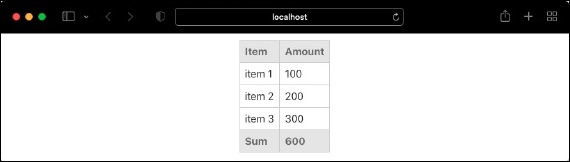
最后,在浏览器中检查应用程序。它将显示费用,如下所示 −
JSX 中的 Map
JSX 允许将任何 JavaScript 表达式包含在其中。由于 map 只是 JavaScript 中的表达式,我们可以直接在 JSX 中使用它,如下所示 −
render() {
   var items = this.props['expenses'];
   var expenses = []

   // expenses = items.map((item, idx) => <tr><td>item {idx + 1}</td><td>{item}</td></tr>)
   var total = this.getTotalExpenses();
   return <table>
      <thead>
         <tr>
            <th>Item</th>
            <th>Amount</th>
         </tr>
      </thead>
      <tbody>
         {items.map((item, idx) => <tr><td>item {idx + 1}</td><td>{item}</td></tr>)}
      </tbody>
      <tfoot>
         <tr>
            <th>Sum</th>
            <th>{total}</th>
         </tr>
      </tfoot>
   </table>
}
export default ExpenseListUsingForLoop

