
ReactJS - Helmet
Web 文档的元信息对于 SEO 目的非常重要。文档的元信息通常使用 meta 标签在头部内指定。title 标签在提供有关文档的元信息方面也起着重要作用。头部部分也会有脚本和样式标签。Helmet 组件通过提供所有有效的头部标签,提供了一种管理文档头部部分的简便方法。 Helmet 将收集其中指定的所有信息并更新文档的 head 部分。
让我们在本章中学习如何使用 Helmet 组件。
安装 Helmet
在了解 Helmet 的概念和用法之前,让我们先学习如何使用 npm 命令安装 Helmet 组件。
npm install --save react-helmet
上述命令将安装 Helmet 组件,并准备在我们的应用程序中使用。
Helmet 的概念和用法
Helmet 接受所有有效的 head 标签。它接受纯 HTML 标签并在文档的 head 部分输出标签,如下所示 −
import React from "react";
import {Helmet} from "react-helmet";
class Application extends React.Component {
   render () {
      return (
         <div className="application">
            <Helmet>
               <title>Helmet sample application</title>
               <meta charSet="utf-8" />
               <meta name="description" content="Helmet sample program to understand the working of the helmet component" />
               <meta name="keywords" content="React, Helmet, HTML, CSS, Javascript" />
               <meta name="author" content="Peter" />
               <meta name="viewport" content="width=device-width, initial-scale=1.0" />
            </Helmet>
            // ...
         </div>
      );
   }
};
此处,
title用于指定文档的标题
description元标记用于指定文档的详细信息
keywords用于指定文档的主要关键字。它将被搜索引擎使用。
author用于指定文档的作者
viewport用于指定文档的默认视口
charSet用于指定文档中使用的字符集。
head 部分的输出将如下所示 −
<head>
   <title>Helmet sample application</title>
   <meta charSet="utf-8" />
   <meta name="description" content="Helmet sample program to understand the working of the helmet component" />
   <meta name="keywords" content="React, Helmet, HTML, CSS, Javascript" />
   <meta name="author" content="Peter" />
   <meta name="viewport" content="width=device-width, initial-scale=1.0" />
</head>
Helmet 组件可以在任何其他 React 组件内部使用,以更改标题部分。它也可以嵌套,这样当子组件被渲染时,标题部分就会发生变化。
<Parent>
   <Helmet>
      <title>Helmet sample application</title>
      <meta charSet="utf-8" />
      <meta name="description" content="Helmet sample program to understand the working of the helmet component" />
      <meta name="keywords" content="React, Helmet, HTML, CSS, Javascript" />
      <meta name="author" content="Peter" />
      <meta name="viewport" content="width=device-width, initial-scale=1.0" />
   </Helmet>
   <Child>
      <Helmet>
         <title>Helmet sample application :: rendered by child component</title>
         <meta name="description" content="Helmet sample program to explain nested feature of the helmet component" />
      </Helmet>
   </Child>
</Parent>
此处,
子组件中的头盔将更新头部部分,如下所示,
<head>
   <title>Helmet sample application :: rendered by child component</title>
   <meta charSet="utf-8" />
   <meta name="description" content="Helmet sample program to explain nested feature of the helmet component" />
   <meta name="keywords" content="React, Helmet, HTML, CSS, Javascript">
   <meta name="author" content="Peter">
   <meta name="viewport" content="width=device-width, initial-scale=1.0">
</head>
应用 Helmet
让我们创建一个新的 React 应用程序来学习如何在本节中应用 Helmet 组件。
首先,创建一个新的 React 应用程序并使用以下命令启动它。
create-react-app myapp
cd myapp
npm start
接下来,打开 App.css (src/App.css) 并删除所有 CSS 类。
// 删除所有 css 类
接下来,创建一个简单的组件 SimpleHelmet (src/Components/SimpleHelmet.js) 并渲染一个 −
import React from "react";
import {Helmet} from "react-helmet";
class SimpleHelmet extends React.Component {
   render() {
      return (
         <div>
            <Helmet>
               <title>Helmet sample application</title>
               <meta charSet="utf-8" />
               <meta name="description" content="Helmet sample program to understand the working of the helmet component" />
               <meta name="keywords" content="React, Helmet, HTML, CSS, Javascript" />
               <meta name="author" content="Peter" />
               <meta name="viewport" content="width=device-width, initial-scale=1.0" />
            </Helmet>
            <p>A sample application to demonstrate helmet component.</p>
         </div>
      )
   }
}
export default SimpleHelmet;
这里我们有,
从 react-helmet 包导入 Helmet
在组件中使用 Helmet 来更新 head 部分。
接下来,打开 App 组件 (src/App.js),并使用 SimpleHelmet 组件,如下所示 −
import './App.css'
import React from 'react';
import SimpleHelmet from './Components/SimpleHelmet'

function App() {
   return (
      <div className="container">
         <div style={{ padding: "10px" }}>
            <div>
               <SimpleHelmet />
            </div>
         </div>
      </div>
   );
}
export default App;
这里我们有,
从 react 包中导入 SimpleHelmet 组件
使用 SimpleHelmet 组件
接下来,打开 index.html (public/index.html) 文件并删除元标记,如下所示 -
<!DOCTYPE html>
<html lang="en">
<head>
   <link rel="icon" href="%PUBLIC_URL%/favicon.ico" />
   <link rel="apple-touch-icon" href="%PUBLIC_URL%/logo192.png" />
   <link rel="manifest" href="%PUBLIC_URL%/manifest.json" />
</head>
<body>
   <noscript>You need to enable JavaScript to run this app.</noscript>
   <div style="padding: 10px;">
      <div id="root"></div>
   </div>
</body>
</html>
这里,
title标签被移除
description、theme-color、viewport的meta标签被移除
最后在浏览器中打开应用,查看最终效果。
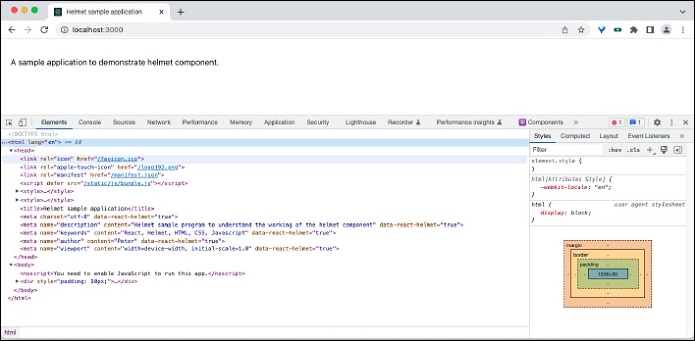
在开发工具中打开源码,可以看到如下图所示的html信息 −
<title>Helmet sample application</title>
<meta charset="utf-8" data-react-helmet="true">
<meta name="description" content="Helmet sample program to understand the working of the helmet component" data-react-helmet="true">
<meta name="keywords" content="React, Helmet, HTML, CSS, Javascript" data-react-helmet="true">
<meta name="author" content="Peter" data-react-helmet="true">
<meta name="viewport" content="width=device-width, initial-scale=1.0" data-react-helmet="true">
摘要
Helmet 组件是一个易于使用的组件,用于管理文档的头部内容,支持服务器端和客户端渲染。

