
ReactJS - 高阶组件
由于 React 组件是通过组合(一个组件位于另一个组件内)而不是通过继承来互连的,因此 React 组件中使用的逻辑不会直接共享给另一个组件。React 社区提供了多种选项来在组件之间共享逻辑,其中一种选项就是高阶组件。HOC 本身不是 React API,而是一种没有副作用的设计模式。
让我们在本章中学习如何使用高阶组件。
如何使用高阶组件
基本上,HOC 是一个函数,它将 React 组件作为输入,然后根据输入组件创建一个新的 React 组件并返回新创建的(包装的)组件。例如,HOC 函数可以接收纯数据渲染组件作为输入,然后返回一个具有数据获取功能的新组件 &使用输入组件的数据渲染功能。
让我们一步一步地看看如何使用 HOC 并在两个组件之间共享逻辑。让我们考虑从外部 URL 获取和渲染数据的场景。
根据功能创建一个具有一个或多个输入参数的 HOC 函数。
HOC 函数的第一个参数应该是具有辅助逻辑(例如,数据渲染逻辑)的反应组件。
HOC 函数的第二个参数应根据我们的要求定义。对于我们的数据获取场景,数据 URL 是获取数据的必要信息。因此,我们应该将其作为 HOC 函数的第二个参数。
function createHOC(WrappedComponent, url) {
    // 使用 WrappedComponent 创建新组件
}
如果确实有必要,HOC 函数可以使用任意数量的参数。
在 HOC 函数内部创建一个新组件,在其 componentDidMount 事件中支持主要逻辑(例如,使用第二个 url 参数获取数据逻辑)。
function createFetchHOC(WrappedComponent, url) {
   class DataFetcher extends React.Component {
      componentDidMount() {
         fetch(url)
            .then((response) => response.json())
            .then((data) => {
               this.setState({
                  data: data
               });
         });
      }
   }
}
通过传递从 componentDidMount 事件获取的数据来呈现输入组件。
function createFetchHOC(WrappedComponent, url) {
   class DataFetcher extends React.Component {
      render() {
         return (
            <WrappedComponent data={this.state.data} {...this.props} />
         )
      }
   }
}
返回新创建的组件。
function createFetchHOC(WrappedComponent, url) {
   class DataFetcher extends React.Component {
   }
   return DataFetcher;
}
通过结合 DataFetcher(createFetchHOC)和 Wrapped 组件创建一个新组件。
const UserListWithFetch = createFetchHOC(
   UserList,
   "users.json"
);
最后,根据需要在任何地方使用新组件
<UserListWithFetch />
应用 HOC 组件
让我们通过应用 HOC 组件创建一个新的应用程序。
首先,创建一个新的 React 应用程序并使用以下命令启动它。
create-react-app myapp
cd myapp
npm start
接下来,打开 App.css (src/App.css) 并删除所有 CSS 类。
// 删除所有 css 类
接下来,创建一个新的 HOC 函数,如下所示 −
import React from 'react';
function createFetchHOC(WrappedComponent, url) {
   class DataFetcher extends React.Component {
      constructor(props) {
         super(props);
         this.state = {
            data: []
         };
      }

      componentDidMount() {
         fetch(url)
         .then((response) => response.json())
         .then((data) => {
            this.setState({
               data: data
            });
         });
      }
      render() {
         return (
            <WrappedComponent data={this.state.data} {...this.props} />
         )
      }
   }
   return DataFetcher;
}
export default createFetchHOC;
接下来,在 public 文件夹中创建一个文件 users.json (public/users.json) 来存储用户信息。我们将尝试使用 FetchRenderProps 组件获取它并在我们的应用程序中显示它。
[{"id":1,"name":"Fowler","age":18},
{"id":2,"name":"Donnell","age":24},
{"id":3,"name":"Pall","age":26}]
接下来,在 public 文件夹中创建一个文件 todo_list.json (public/todo_list.json) 来存储待办事项列表信息。我们将尝试使用 FetchRenderProps 组件获取它并在我们的应用程序中显示它。
[{"id":1,"title":"Learn JavaScript","is_done":true},
{"id":2,"title":"Learn React","is_done":true},
{"id":3,"title":"Learn Typescript","is_done":false}]
接下来,创建一个新组件 UserList (src/Components/UserList.js) 来呈现用户,如下所示 −
import React from "react";
class UserList extends React.Component {
   constructor(props) {
      super(props);
   }
   render() {
      return (
         <>
            <ul>
               {this.props.data && this.props.data.length && this.props.data.map((item) =>
                  <li key={item.id}>{item.name}</li>
               )}
            </ul>
         </>
      )
   }
}
export default UserList;
在这里,我们使用了数据 props 来呈现用户列表
接下来,创建一个新组件 TodoList (src/Components/TodoList.js) 来呈现待办事项,如下所示 −
import React from "react";
class TodoList extends React.Component {
   constructor(props) {
      super(props);
      this.todos = this.props.data
   }
   render() {
      return (
         <>
            <ul>
               {this.props.data && this.props.data.length && this.props.data.map(
                  (item) =>
                  <li key={item.id}>{item.title} {item.is_done && <strong>Done</strong>}</li>
               )}
            </ul>
         </>
      )
   }
}
export default TodoList;
在这里,我们使用数据道具来呈现待办事项列表。
接下来,创建一个新组件 SimpleHOC,通过单个 HOC 组件呈现用户列表和待办事项列表。
import React from "react";
import UserList from "./UserList";
import TodoList from "./TodoList";
import createFetchHOC from "./createFetchHOC";
const UserListWithFetch = createFetchHOC(
   UserList,
   "users.json"
);

const TodoListWithFetch = createFetchHOC(
   TodoList,
   "todo_list.json"
);

class SimpleHOC extends React.Component {
   constructor(props) {
      super(props);
   }
   render() {
      return (
      <>
         <UserListWithFetch />
         <TodoListWithFetch />
      </>
      )
   }
}
export default SimpleHOC;
这里我们有,
通过结合 TodoList 和 DataFetcher 组件创建 UserListWithFetch 组件。
通过结合 Users 和 DataFetcher 组件创建 TodoListWithFetch 组件。
接下来,打开 App.js 并使用 SimpleHOC 组件对其进行更新。
import './App.css'
import React from 'react';
import SimpleHOC from './Components/SimpleHOC'

function App() {
   return (
      <div className="container">
         <div style={{ padding: "10px" }}>
            <div>
               <SimpleHOC />
            </div>
         </div>
      </div>
   );
}
export default App;
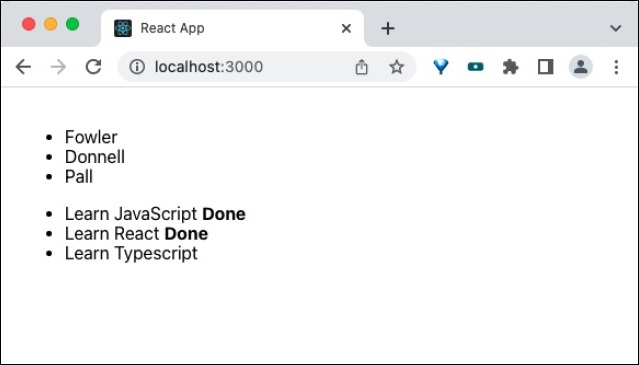
最后,在浏览器中打开应用程序并检查最终结果。应用程序将呈现如下图所示 −
摘要
高阶组件是一种在组件之间共享逻辑的有效方法。它在许多第三方组件中被广泛使用,成功率很高,并且是经过时间考验的在 React 域中共享逻辑的方法。

