
ReactJS - isCompositeComponentWithType()
众所周知,React 中的每个组件都有自己的生命周期,这意味着它们在我们的项目中运行时会经历不同的阶段。React 提供了内置方法来控制这些过程。
现在让我们看一下 isCompositeComponentWithType() 方法。此方法告诉我们程序的给定元素是否是 React 组件。以下是我们可以如何使用它 −
语法
isCompositeComponentWithType(
   instance,
   componentClass
)
参数
在 React 中,isCompositeComponentWithType 方法需要两个参数 −
instance − 此参数提供我们要测试的组件实例。
componentClass − 此参数表示一个 React 组件类。
返回值
该函数将确定该实例是否是此组件类的实例。该函数产生布尔结果 −
如果实例是类型与 componentClass 匹配的组件,则返回 true。
如果实例不是所提供 componentClass 的组件,则返回 false。
示例
示例 − 简单应用
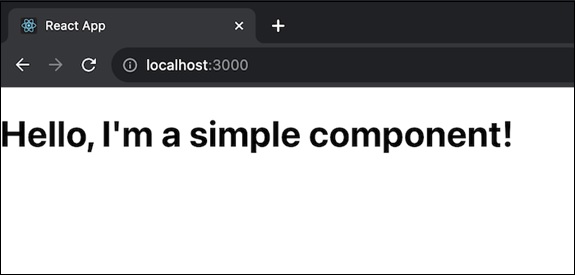
让我们创建一个带有组件的简单 React 应用,然后在测试中使用 isCompositeComponentWithType()。我们将有一个简单的 React 组件 (MyComponent) 和一个测试代码。测试使用 isCompositeComponentWithType() 检查渲染的组件是否是类型为"div"的复合组件。此应用的代码如下 −
MyComponent.js
import React from 'react';
import { render } from '@testing-library/react';
import { isCompositeComponentWithType } from 'react-dom/test-utils';

const MyComponent = () => {
   return (
      <div>
         <h1>Hello, I'm a simple component!</h1>
      </div>
   );
};
export default MyComponent;
test('MyComponent is a composite component of type "div"', () => {
   const { container } = render(<MyComponent />);
   const isComposite = isCompositeComponentWithType(container.firstChild, 'div');
   expect(isComposite).toBe(true);
});
输出
示例 − 测试按钮应用
以下是包含 isCompositeComponentWithType() 方法的 App.js 文件的完整代码,用于展示该方法的用法。
import React from 'react';
import { isCompositeComponentWithType } from 'react-dom/test-utils';

// Define App Component
const App = () => {

   // Function to show isCompositeComponentWithType()
   function myFunction() {
      var a = isCompositeComponentWithType(el);
      console.log("Is the following element a composite component? " + a);
   }

   // 需要测试的元素
   const el = <div>
      <h1>element</h1>
   </div>

   // 返回用户界面
   return (
      <div id='el'>
         <h1>React isCompositeComponentWithType() method usage</h1>
         <button onClick={myFunction}>
         Click Me !!
         </button>
      </div>
   );
}

export default App;
输出
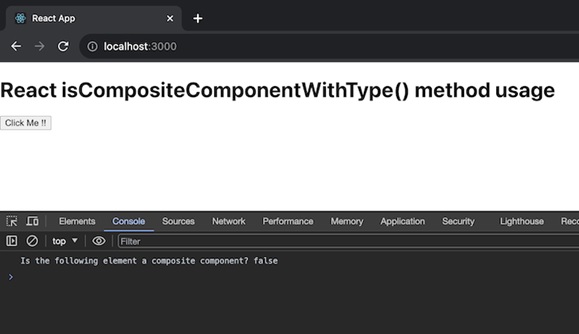
此代码显示一个 App 组件,该组件具有一个函数 myFunction,用于显示 isCompositeComponentWithType() 方法。当我们单击应用中的按钮时,它将检查 el 元素是否为复合组件并记录结果。
假设我们正在创建一个数字店面,并想知道我们网站的特定部分是否是产品列表类型。我们可以通过调用 isCompositeComponentWithType() 函数来实现这一点。首先,我们导入所需的工具,构建一个函数来验证,创建一个元素(产品列表),然后使用测试按钮将其显示在我们的网站上。
示例 − 从 API 获取数据
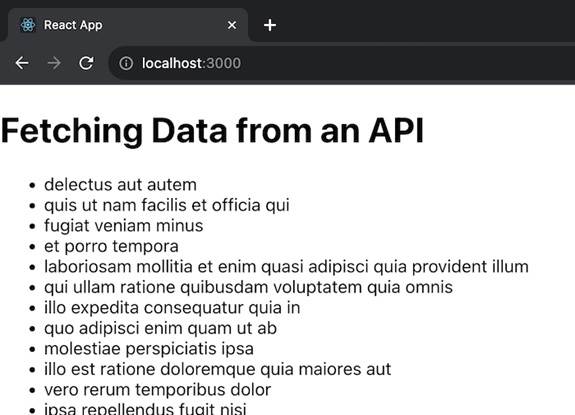
现在我们将有一个从 API 获取和显示数据的应用。还有使用 isCompositeComponentWithType() 测试 FetchData 组件是否呈现从 API 获取的数据的测试文件。它使用来自 @testing-library/react 的 render 函数来呈现组件,并使用 waitFor 等待异步获取调用完成。此应用程序的代码如下 −
// FetchData.js
import React, { useState, useEffect } from 'react';

const FetchData = () => {
   const [data, setData] = useState([]);
   useEffect(() => {
      const fetchData = async () => {
      try {
         const response = await fetch('https://jsonplaceholder.typicode.com/todos');
         const result = await response.json();
         setData(result);
      } catch (error) {
         console.error('Error fetching data:', error);
      }
   };
   fetchData();
   }, []);

   return (
      <div>
         <h1>Fetching Data from an API</h1>
         <ul>
            {data.map(item => (
               <li key={item.id}>{item.title}</li>
            ))}
         </ul>
      </div>
   );
};

export default FetchData;
FetchData.test.js
import React from 'react';
import { render, waitFor } from '@testing-library/react';
import FetchData from './FetchData';

// fetch function
global.fetch = jest.fn(() =>
Promise.resolve({
   json: () => Promise.resolve([{ id: 1, title: 'Sample Todo' }]),
})
);

test('FetchData renders data from API', async () => {
   const { getByText } = render(<FetchData />);

   // 等待获取调用
   await waitFor(() => expect(fetch).toHaveBeenCalledTimes(1));

   const todoItem = getByText('Sample Todo');
   expect(todoItem).toBeInTheDocument();
});
输出
摘要
isCompositeComponentWithType() 是一个有用的工具,可用于识别应用程序中的 React 组件类型,并在测试或调试情况下检查其有效性。我们创建了三个不同的应用程序来展示此功能的用法。
 reactjs_reference_api.html
