
ReactJS - 静态 propTypes 属性
我们可以在 React 中使用"propTypes"来定义我们的组件应该接收的属性 (props) 类型。这确保只向我们的组件提供正确的信息,从而使我们的代码更安全。
PropTypes 可以被视为一种表达我们的组件期望接收什么类型信息的方式。它是一种对我们的组件说"嘿,我期待某种类型的数据,所以请确保我们得到它!"的形式
换句话说,我们可以说 PropTypes 是 React 中用于对提供给 React 组件的 props 进行类型检查的方法。它通过为每个参数定义预期类型来帮助开发人员检测常见问题。propTypes 属性作为静态属性添加到 React 组件类中,这意味着它链接到类而不是类的实例。
导入 propTypes
import PropTypes from 'prop-types';
示例
示例 1
因此,我们正在创建一个带有静态 propTypes 的小型 React 应用程序来定义我们的组件将需要的 props 类型。让我们创建一个接受我们的名字和问候。
import React from 'react';
import PropTypes from 'prop-types';

class Greeting extends React.Component {
   // 定义 propTypes
   static propTypes = {
      name: PropTypes.string.isRequired, // 'isRequired' means this prop is mandatory
   };
   render() {
      return (
         <div>
            <h1>Hello, {this.props.name}!</h1>
         </div>
      );
   }
}
class App extends React.Component {
   constructor(props) {
      super(props);
      this.state = {
         userName: '',
      };
   }
   handleNameChange = (event) => {
      this.setState({ userName: event.target.value });
   };
   render() {
      return (
         <div>
            <h1>Simple Greeting App</h1>
            <label>
               Enter your name:
            <input
               type="text"
               value={this.state.userName}
               onChange={this.handleNameChange}
            />
            </label>
            {/* Render the Greeting component and pass the name as a prop */}
            <Greeting name={this.state.userName} />
         </div>
      );
   }
}

export default App;
输出

本例中有两个组件:Greeting 和 App。Greeting 组件需要一个名为 name 的字符串类型 prop,该 prop 标记为 isRequired,表示必须提供。
App 组件是一个简单的应用程序,我们可以在其中的输入框中输入我们的名字。然后将给定的名字作为 prop 发送到 Greeting 组件,该组件显示问候消息。
在启动此应用程序之前,请记住设置我们的 React 环境并安装必要的软件包,包括 prop-types。
示例 2
让我们创建另一个使用静态 propTypes 的小型 React 应用程序。这次让我们创建一个 Counter 应用程序。Counter 组件将显示一个数字作为 prop。如果没有指定数字,它将被设置为 0。
import React from 'react';
import PropTypes from 'prop-types';

class Counter extends React.Component {
   // 为 Counter 组件定义 propTypes
   static propTypes = {
      number: PropTypes.number.isRequired,
   };
   render() {
      return (
         <div>
            <h2>Counter: {this.props.number}</h2>
         </div>
      );
   }
}
class CounterApp extends React.Component {
   constructor(props) {
      super(props);
      this.state = {
         count: 0,
      };
   }
   handleIncrement = () => {
      this.setState((prevState) => ({ count: prevState.count + 1 }));
   };

   handleDecrement = () => {
      this.setState((prevState) => ({ count: prevState.count - 1 }));
   };
   render() {
      return (
         <div>
            <h1>Simple Counter App</h1>
            {/* Render the Counter component and pass the count as a prop */}
            <Counter number={this.state.count} />

            <button onClick={this.handleIncrement}>Increment</button>
            <button onClick={this.handleDecrement}>Decrement</button>
         </div>
      );
   }
}

export default CounterApp;
输出
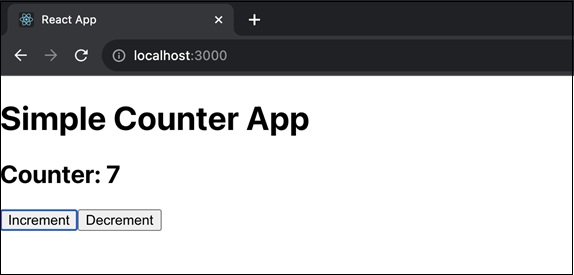
我们在此应用中创建了一个带有 propTypes 的 Counter 组件,用于数字 prop。CounterApp 组件保留计数以及在其状态下增加和减少计数的按钮。Counter 组件显示当前计数。
示例 3
让我们再创建一个使用静态 propTypes 的小型 React 应用。这次,我们将创建一个 ColorBox 组件,它将颜色作为 prop 并显示一个彩色框。
import React from 'react';
import PropTypes from 'prop-types';

class ColorBox extends React.Component {
   // 为 ColorBox 组件定义 propTypes
   static propTypes = {
      color: PropTypes.string.isRequired,
   };
   render() {
      const boxStyle = {
         width: '100px',
         height: '100px',
         backgroundColor: this.props.color,
      };

      return (
         <div>
            <h2>Color Box</h2>
            <div style={boxStyle}></div>
         </div>
      );
   }
}
class ColorBoxApp extends React.Component {
   constructor(props) {
      super(props);
      this.state = {
         selectedColor: 'blue',
      };
   }
   handleColorChange = (event) => {
      this.setState({ selectedColor: event.target.value });
   };
   render() {
      return (
         <div>
            <h1>Color Box App</h1>
            <label>
               Select a color:
               <select value={this.state.selectedColor} onChange={this.handleColorChange}>
                  <option value="red">Red</option>
                  <option value="green">Green</option>
                  <option value="blue">Blue</option>
               </select>
            </label>

            <ColorBox color={this.state.selectedColor} />
         </div>
      );
   }
}

export default ColorBoxApp;
输出
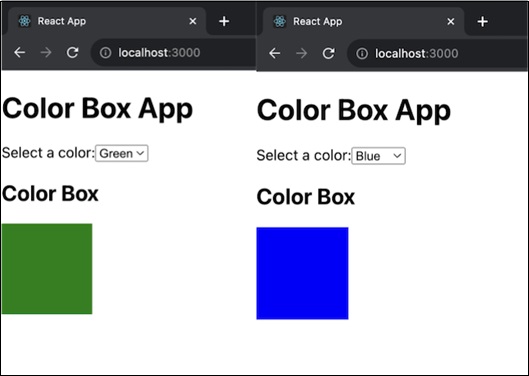
在此应用中,ColorBox 组件对颜色 prop 具有 propTypes 要求。ColorBoxApp 组件将选定的颜色保持在其状态并提供颜色选择下拉列表。然后使用 ColorBox 组件根据所选颜色显示彩色框。
摘要
PropTypes 是 React 的一项功能,它允许我们定义组件将接收的预期属性 (props) 类型。它允许开发人员在开发之前指定 props 的数据类型,从而有助于检测潜在问题。
 reactjs_reference_api.html
