
ReactJS - testInstance.findByProps() 方法
testInstance.findByProps(props) 是一个测试函数。testInstance 很可能是指软件测试环境中的测试实例或对象。findByProps(props) 是一个组件,这一简单事实表明我们正在测试实例中搜索特定内容。术语"props"指的是属性,即我们正在寻找的项目的属性。
此代码查找具有特定属性的单个测试对象。这就像在许多项目中寻找特定项目一样。如果只有一个匹配项,则返回该实例。如果没有,则显示错误消息。
语法
testInstance.findByProps(props)
参数
props −术语"props"指的是属性,即我们正在寻找的项目的属性。
返回值
此代码查找具有特定功能的单个测试对象。就像寻找一个对象一样。如果只有一个匹配项,则返回该实例。如果不是这种情况,则显示错误消息。
示例
示例 − 基本组件测试
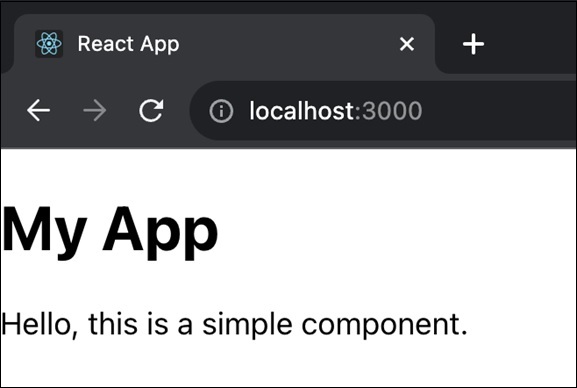
使用 testInstance.findByProps(props) 方法创建 React 应用涉及编写测试用例以在我们的 React 组件中查找具有某些属性的特定元素。以下是此应用的简单代码 −
MyComponent.js
import React from 'react';

const MyComponent = ({ title }) => (
   <div>
      <h1>{title}</h1>
      <p>Hello, this is a simple component.</p>
   </div>
);

export default MyComponent;
MyComponent.test.js
 import React from 'react';
import { render } from '@testing-library/react';
import MyComponent from './MyComponent';

test('finds the title using findByProps', () => {
   const { findByProps } = render(<MyComponent title="My App" />);
   const titleElement = findByProps({ title: 'My App' });
   expect(titleElement).toBeInTheDocument();
});
输出
示例 − 列表组件测试
现在我们将创建一个名为 ListComponent 的 React 组件。它需要一个数组形式的 prop item。它渲染一个无序列表 (<ul>),其中列表项 (<li>) 由 items 数组的元素生成。
然后我们将为 ListComponent 组件创建 ListComponent.test.js。它使用 @testing-library/react 库中的 render 函数来渲染带有 prop items 的 ListComponent。测试函数使用 findByProps 检查渲染组件中是否存在带有文本"Item 2"的列表项。
ListComponent.js
import React from 'react';

const ListComponent = ({ items }) => (
   <ul>
      {items.map((item, index) => (
         <li key={index}>{item}</li>
      ))}
   </ul>
);

export default ListComponent;
ListComponent.test.js
import React from 'react';
import { render } from '@testing-library/react';
import ListComponent from './ListComponent';

test('finds the list item using findByProps', () => {
   const items = ['Item 1', 'Item 2', 'Item 3'];
   const { findByProps } = render(<ListComponent items={items} />);
   const listItem = findByProps({ children: 'Item 2' });
   expect(listItem).toBeInTheDocument();
});
输出
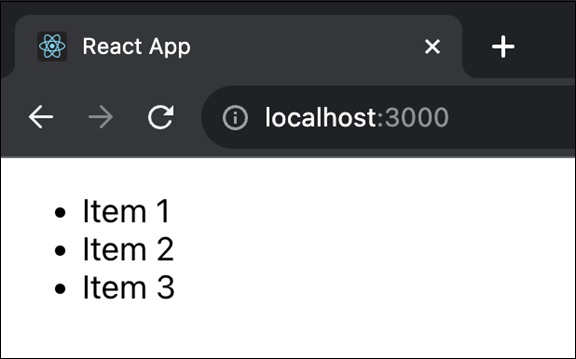
此代码测试带有项目列表的 ListComponent 的渲染,并借助 findByProps 方法检查组件中是否存在特定列表项("项目 2")。
示例 − 表单组件测试
这次我们将创建一个名为 FormComponent 的 React 组件。它由一个带有输入字段的表单组成。使用 useState Hooks(钩子)控制输入字段以管理 inputValue。标签具有 htmlFor 属性,输入字段使用相同的 id。
然后我们将为 FormComponent 组件创建一个测试文件 (FormComponent.test.js)。测试检查输入字段是否以空值("")开头,并断言它最初存在于文档中。 fireEvent.change 模拟用户在输入字段中输入"Hello, World!"。然后,它使用 findByProps 搜索具有更新值的输入字段,并断言该字段存在于文档中。
FormComponent.js
import React, { useState } from 'react';

const FormComponent = () => {
   const [inputValue, setInputValue] = useState('');

   return (
      <form>
         <label htmlFor="inputField">Type something:</label>
         <input
            type="text"
            id="inputField"
            value={inputValue}
            onChange={(e) => setInputValue(e.target.value)}
         />
      </form>
   );
};

export default FormComponent;
FormComponent.test.js
import React from 'react';
import { render, fireEvent } from '@testing-library/react';
import FormComponent from './FormComponent';

test('finds the input value using findByProps', async () => {
   const { findByProps } = render(<FormComponent />);
   const inputElement = findByProps({ value: '' });
   expect(inputElement).toBeInTheDocument();

   fireEvent.change(inputElement, { target: { value: 'Hello, World!' } });
   const updatedInputElement = findByProps({ value: 'Hello, World!' });
   expect(updatedInputElement).toBeInTheDocument();
});
此代码通过检查用户输入时输入字段是否正确更新来测试 FormComponent 的渲染和用户交互。
摘要
因此,testInstance.findByProps(props) 可帮助我们在测试期间找到具有特定属性的对象。如果发现一个匹配项,则成功。否则,将发送错误。我们已经看到了不同的应用程序和案例,我们可以在其中使用此功能来测试 React 应用程序。
 reactjs_reference_api.html
