
ReactJS - UNSAFE_componentWillMount() 方法
React 中的 componentWillMount() 函数就像组件出现在网页上之前的准备步骤。它发生在组件显示之前。此函数获取数据,但需要注意的是,在组件首次显示之前,它不会提供任何结果。由于获取数据可能需要一些时间,因此组件不会等待此阶段完成后再显示自身。
在最近的 React 版本中,不再建议使用 componentWillMount()。他们建议改用 componentDidMount()。如果我们真的想使用 componentWillMount(),我们可以,但我们必须将其称为 UNSAFE_componentWillMount()。这就像一个警告标志,告诉 React 开发人员应该避免使用它。
语法
UNSAFE_componentWillMount() {
    //我们想要执行的操作将在这里执行
}
参数
此方法不接受任何参数。
返回值
此方法不应返回任何内容。
示例
示例 − 显示警告消息
借助 UNSAFE_componentWillMount() 函数,以下是 React 应用程序在加载组件之前显示警告的示例。
import React, { Component } from 'react';

class App extends Component {
   UNSAFE_componentWillMount() {
      alert("This message will appear before the component loads.");
   }
   render() {
      return (
         <div>
            <h1>Welcome to My React App</h1>
            <p>This is a simple application using UNSAFE_componentWillMount().</p>
         </div>
      );
   }
}

export default App;
输出
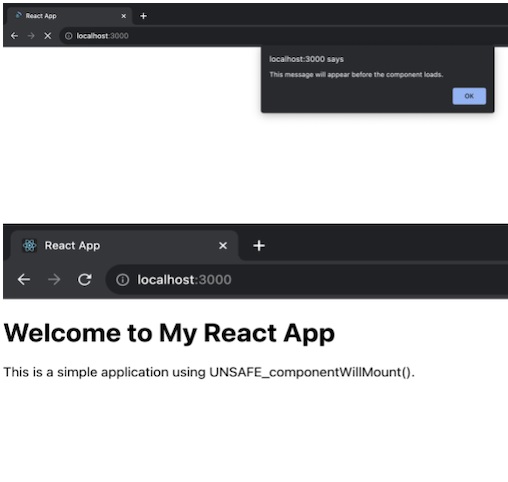
这是一个简单示例,用于在网页上加载我们的 React 组件之前应用 UNSAFE_componentWillMount() 显示一条消息。请记住,在最近的 React 版本中,componentDidMount() 比 UNSAFE_componentWillMount() 更适合实现类似的功能。
示例 − 数据获取应用程序
在此示例中,我们将创建一个组件,在即将安装时从 JSONPlaceholder API 获取数据。获取的数据随后将存储在组件的状态中,并且组件会在数据可用时呈现数据。因此,此应用程序的代码如下 −
import React, { Component } from 'react';
import './App.css'

class DataFetchingApp extends Component {
   constructor() {
      super();
      this.state = {
         data: null,
      };
   }
   UNSAFE_componentWillMount() {
      // 从 API 获取数据
      fetch('https://jsonplaceholder.typicode.com/todos/1')
      .then((response) => response.json())
      .then((data) => {
         this.setState({ data });
      })
      .catch((error) => console.error('Error fetching data:', error));
   }
   render() {
      const { data } = this.state;

      return (
         <div className='App'>
            <h1>Data Fetching App</h1>
            {data ? (
               <div>
                  <h2>Data from API:</h2>
                  <p>Title: {data.title}</p>
                  <p>User ID: {data.userId}</p>
                  <p>Completed: {data.completed ? 'Yes' : 'No'}</p>
               </div>
               ) : (
               <p>Loading data...</p>
               )}
         </div>
      );
   }
}

export default DataFetchingApp;
App.css
.App {
   align-items: center;
   justify-content: center;
   margin-left: 500px;
   margin-top: 50px;
}
h1 {
   color: red;
}
p {
   margin: 8px 0;
   color: green;
}
输出
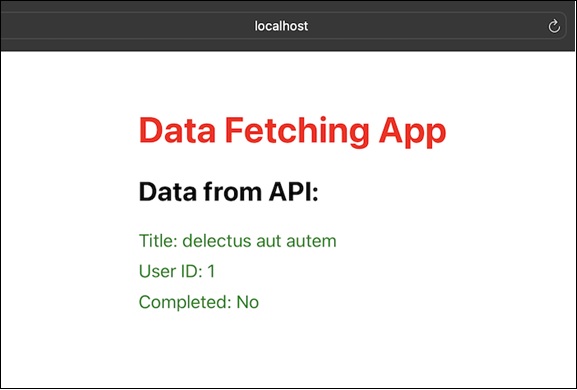
在此 React 应用中,我们在组件安装之前使用 UNSAFE_componentWillMount() 从 API 获取数据。因此,我们使用 API 来获取数据。
示例 − 倒数计时器应用
现在我们有另一个简单的 React 应用,它使用 UNSAFE_componentWillMount() 设置倒数计时器。在此应用中,我们将有一个计时器,它将倒计时 10 秒,10 秒后,它将在屏幕上显示一条警告消息,表明时间已达到零。因此,此应用的代码如下 −
import React, { Component } from 'react';
import './App.css';

class CountdownTimerApp extends Component {
   constructor() {
      super();
      this.state = {
         seconds: 10,
      };
   }
   UNSAFE_componentWillMount() {
      this.startTimer();
   }
   startTimer() {
      this.timerInterval = setInterval(() => {
         this.setState((prevState) => ({
            seconds: prevState.seconds - 1,
         }), () => {
         if (this.state.seconds === 0) {
            clearInterval(this.timerInterval);
            alert('Countdown timer reached zero!');
         }
         });
      }, 1000);
   }

   render() {
      return (
         <div className='App'>
            <h1>Countdown Timer App</h1>
            <p>Seconds remaining: {this.state.seconds}</p>
         </div>
      );
   }
}

export default CountdownTimerApp;
输出
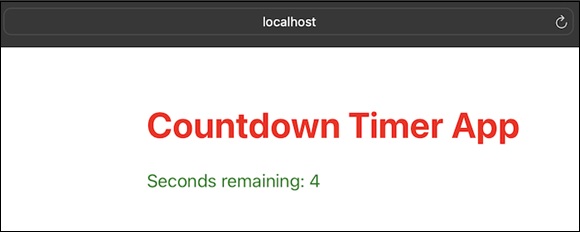
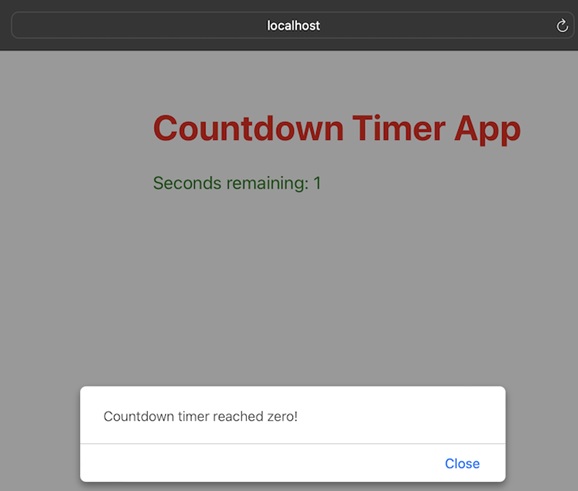
在此示例中,组件在 UNSAFE_componentWillMount() 生命周期方法中启动倒计时计时器。每一秒,计时器都会减少秒数状态。当倒计时归零时,间隔被清除并显示警报。
限制
如果组件使用 getDerivedStateFromProps 或 getSnapshotBeforeUpdate,则不会调用此方法。
UNSAFE_componentWillMount 不保证组件在某些当前 React 情况下会被挂载,例如 Suspense。
它被命名为"不安全",因为在某些情况下,React 可以丢弃正在进行的组件树并重建它,导致 UNSAFE_componentWillMount 不可靠。
如果我们需要执行依赖于组件挂载的活动,请改用 componentDidMount。
UNSAFE_componentWillMount 是在服务器处于渲染。
在大多数实际用途中,它与构造函数相当,因此最好使用构造函数来实现等效逻辑。
摘要
UNSAFE_componentWillMount() 是一个较旧的 React 生命周期函数,用于预组件加载任务,但在现代 React 编程中,建议遵循当前的最佳实践并使用 componentDidMount() 执行这些任务。
 reactjs_reference_api.html
