
ReactJS - UNSAFE_componentWillReceiveProps() 方法
UNSAFE_componentWillReceiveProps 是一个 React 函数。它用于显示组件即将获取新的 props 或 context。请记住,如果组件使用 getDerivedStateFromProps 或 getSnapshotBeforeUpdate,则不会调用 UNSAFE_componentWillReceiveProps。此外,它不能保证组件将收到新的 props,这对于最近的 React 功能(如 Suspense)尤为重要。
语法
UNSAFE_componentWillReceiveProps(nextProps, nextContext)
参数
nextProps − 这些是组件从其父组件接收的新 props。通过将 nextProps 与 this.props 进行比较,我们可以查看发生了什么变化。
nextContext − 组件需要从最近的提供程序获取新的上下文。要找出不同之处,请将 nextContext 与 this.context 进行比较。这仅在给定静态 contextType 或静态 contextTypes 时可用。
返回值
该方法不返回任何内容。它只是 React 在 props 或 context 即将更改时调用的一个函数。
示例
示例 − 消息应用
以下是如何在小型 React 应用中使用 UNSAFE_componentWillReceiveProps 的示例。在此示例中,我们将创建一个显示消息并在收到新 props 时更新消息的组件。
import React, { Component } from 'react';

class MessageComponent extends Component {
   constructor(props) {
      super(props);
      this.state = {
         message: props.initialMessage,
      };
   }

   // 这是 UNSAFE_componentWillReceiveProps 函数
   UNSAFE_componentWillReceiveProps(nextProps) {
      if (nextProps.newMessage !== this.props.newMessage) {
         // Check if the new message is different
         this.setState({ message: nextProps.newMessage });
      }
   }
   render() {
      return <div>{this.state.message}</div>;
   }
}
class App extends Component {
   constructor() {
      super();
      this.state = {
         message: 'Hello, Tutorialspoint!',
         newMessage: 'Welcome to the React App!',
      };
   }
   updateMessage = () => {
      this.setState({ newMessage: 'Message is Updated!' });
   };

   render() {
      return (
         <div>
            <MessageComponent initialMessage={this.state.message} newMessage={this.state.newMessage} />
            <button onClick={this.updateMessage}>Update Message</button>
         </div>
      );
   }
}

export default App;
输出
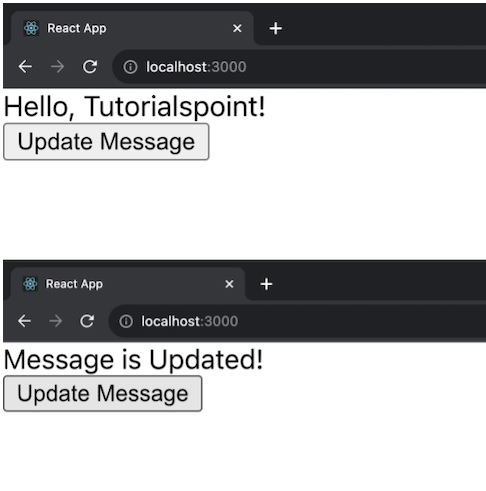
App 和 MessageComponent 是上述示例中的两个组件。当收到新的 props 时,MessageComponent 使用 UNSAFE_componentWillReceiveProps 更新其消息。App 组件有一个按钮可以更改消息。
示例 − 计数器应用
让我们创建另一个简单的 React 应用并将 CSS 应用于应用进行样式设置。此应用将是一个基本的 ToDo 列表,它显示了 UNSAFE_componentWillReceiveProps() 函数的用法。因此,下面是此应用的代码 −
TodoList.js
import React, { Component } from 'react';
import './TodoList.css';

class TodoList extends Component {
   constructor(props) {
      super(props);
      this.state = {
         todos: [],
         newTodo: '',
      };
   }
   UNSAFE_componentWillReceiveProps(nextProps) {
      // 收到新道具时更新待办事项
      if (nextProps.todos !== this.props.todos) {
         this.setState({ todos: nextProps.todos });
      }
   }
   handleInputChange = (event) => {
      this.setState({ newTodo: event.target.value });
   };
   handleAddTodo = () => {
      if (this.state.newTodo) {
         const updatedTodos = [...this.state.todos, this.state.newTodo];
         this.setState({ todos: updatedTodos, newTodo: '' });
      }
   };

   render() {
      return (
         <div className="todo-container App">
            <h2>ToDo List</h2>
            <ul>
               {this.state.todos.map((todo, index) => (
                  <li key={index}>{todo}</li>
               ))}
            </ul>
            <div className="input-container">
               <input
                  type="text"
                  value={this.state.newTodo}
                  onChange={this.handleInputChange}
                  placeholder="Add a new todo"
               />
               <button onClick={this.handleAddTodo}>Add</button>
            </div>
         </div>
      );
   }
}

export default TodoList;
TodoList.css
.todo-container {
   max-width: 400px;
   margin: 20px auto;
   padding: 20px;
   border: 1px solid #ccc;
   border-radius: 8px;
   box-shadow: 0 0 10px rgba(0, 0, 0, 0.1);
}

ul {
   list-style: none;
   padding: 0;
}

li {
   margin-bottom: 8px;
}

.input-container {
   margin-top: 16px;
   display: flex;
}

input {
   flex-grow: 1;
   padding: 8px;
   margin-right: 8px;
}

button {
   padding: 8px 16px;
   background-color: #4caf50;
   color: #fff;
   border: none;
   border-radius: 4px;
   cursor: pointer;
}

button:hover {
   background-color: #45a049;
}
输出
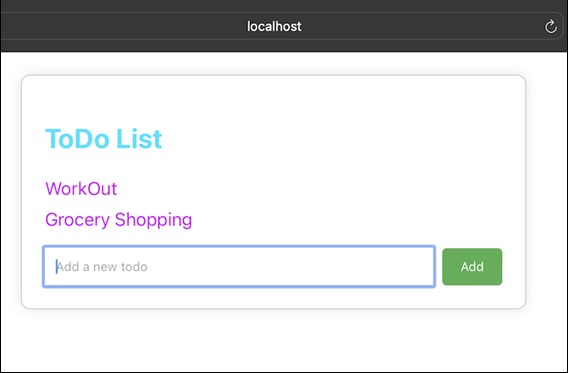
示例 − 个人资料应用
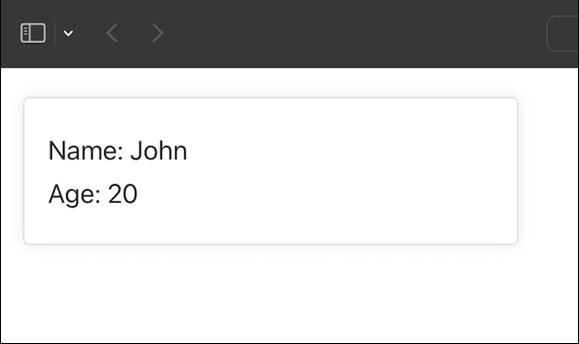
下面是另一个使用 UNSAFE_componentWillReceiveProps() 以及 CSS 进行样式设置的 React 应用示例。此应用是一个简单的"用户个人资料"组件,显示用户的姓名和年龄。
UserProfile.js
import React, { Component } from 'react';
import './UserProfile.css';

class UserProfile extends Component {
   constructor(props) {
      super(props);
      this.state = {
         name: 'John',
         age: 20,
      };
   }
   UNSAFE_componentWillReceiveProps(nextProps) {
      // 收到新道具时更新状态
      if (nextProps.user !== this.props.user) {
         this.setState({
            name: nextProps.user.name,
            age: nextProps.user.age,
         });
      }
   }

   render() {
      return (
         <div className="user-profile-container">
            <p className="user-name">Name: {this.state.name}</p>
            <p className="user-age">Age: {this.state.age}</p>
         </div>
      );
   }
}

export default UserProfile;
UserProfile.css
.user-profile-container {
   max-width: 300px;
   margin: 20px;
   padding: 16px;
   border: 1px solid #ddd;
   border-radius: 4px;
   box-shadow: 0 0 8px rgba(0, 0, 0, 0.1);
}

.user-name, .user-age {
   font-size: 18px;
   color: #333;
   margin: 8px 0;
}
输出
请记住,在现代 React 中,我们通常使用其他生命周期方法或Hooks(钩子)来提供类似于 UNSAFE_componentWillReceiveProps 的功能。
摘要
UNSAFE_componentWillReceiveProps 是一个旧的 React 生命周期函数,当组件将从其父级接收新 props 时调用。它用于通过将新 props 与现有 props 进行比较来响应 prop 更改。在处理新 React 代码中的 props 更改时,最好使用替代方案以获得更安全和一致的行为。
 reactjs_reference_api.html
