
ReactJS - UNSAFE_componentWillUpdate() 方法
在 Web 开发中,UNSAFE_componentWillUpdate() 用作警告。它只在我们要对网站的某个部分进行修改时出现。
请记住,此警告仅在我们更新任何内容时显示,而不是在我们首次创建它时显示。因此,UNSAFE_componentWillUpdate() 用作警告,帮助我们在更新网站时检测问题。
语法
UNSAFE_componentWillUpdate(nextProps, nextState)
参数
此方法接受两个参数:nextProps 和 nextState。
nextProps −这些是我们的 Web 组件将被赋予的新特性(如信息)。这就像获得一组新的指令一样。
nextState − 这反映了我们组件的新状态。这类似于了解当前情况。
返回值
UNSAFE_componentWillUpdate() 不返回任何结果。它更像是进行更改之前的起点,因此它不提供结果或答案。
示例
示例 1
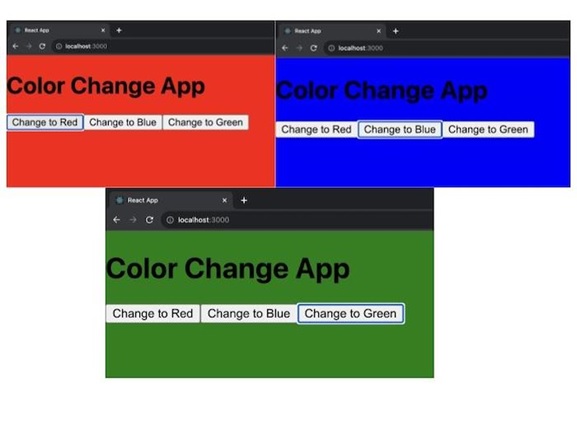
在此示例中,我们将在 React 应用中使用 UNSAFE_componentWillUpdate() 函数来创建一个简单的示例。
我们将有一个名为 App 的基本 React 组件。它将让我们通过单击按钮来更改页面的背景颜色。 UNSAFE_componentWillUpdate() 函数将检测背景颜色的变化并相应地调整页面的背景颜色。
import React, { Component } from 'react';

class App extends Component {
   constructor(props) {
      super(props);
      this.state = {
         backgroundColor: 'white',
      };
   }

   // 这是 UNSAFE_componentWillUpdate() 函数。
   UNSAFE_componentWillUpdate(nextProps, nextState) {
      if (nextState.backgroundColor !== this.state.backgroundColor) {
         document.body.style.backgroundColor = nextState.backgroundColor;
      }
   }
   handleChangeColor = (color) => {
      this.setState({ backgroundColor: color });
   }

   render() {
      return (
         <div>
            <h1>Color Change App</h1>
            <button onClick={() => this.handleChangeColor('red')}>Change to Red</button>
            <button onClick={() => this.handleChangeColor('blue')}>Change to Blue</button>
            <button onClick={() => this.handleChangeColor('green')}>Change to Green</button>
         </div>
      );
   }
}

export default App;
输出
示例 2
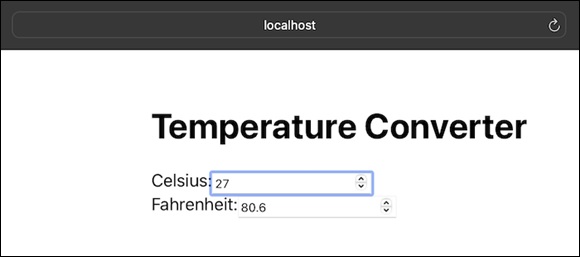
在此示例中,我们将使用 UNSAFE_componentWillUpdate() 函数将温度从摄氏度更新为华氏度。我们可以输入摄氏度或华氏度的温度,程序将立即调整另一个温度值。例如,如果我们输入摄氏度的温度,应用程序将以华氏度显示相应的温度,反之亦然。当我们输入新温度时,它会使用 UNSAFE_componentWillUpdate() 方法处理转换。
因此,下面是相同的代码 −
// TempConverterApp.js
import React, { Component } from 'react';
import './App.css';

class TempConverterApp extends Component {
      constructor(props) {
      super(props);
      this.state = {
         celsius: 0,
         fahrenheit: 32,
      };
   }

   // 使用 UNSAFE_componentWillUpdate() 更新温度值
   UNSAFE_componentWillUpdate(nextProps, nextState) {
      if (nextState.celsius !== this.state.celsius) {

         // 将摄氏度转换为华氏度
         nextState.fahrenheit = (nextState.celsius * 9) / 5 + 32;
      } else if (nextState.fahrenheit !== this.state.fahrenheit) {

         // 将华氏度转换为摄氏度
         nextState.celsius = ((nextState.fahrenheit - 32) * 5) / 9;
      }
   }
   handleChangeCelsius = (value) => {
      this.setState({ celsius: value });
   };
   handleChangeFahrenheit = (value) => {
      this.setState({ fahrenheit: value });
   };

   render() {
      return (
         <div className='App'>
            <h1>Temperature Converter</h1>
            <label>
               Celsius:
               <input
                  type="number"
                  value={this.state.celsius}
                  onChange={(e) => this.handleChangeCelsius(e.target.value)}
               />
               </label>
               <br />
            <label>
               Fahrenheit:
               <input
                  type="number"
                  value={this.state.fahrenheit}
                  onChange={(e) => this.handleChangeFahrenheit(e.target.value)}
               />
            </label>
         </div>
      );
   }
}

export default TempConverterApp;
输出
Normal:用于普通文本。
示例 3
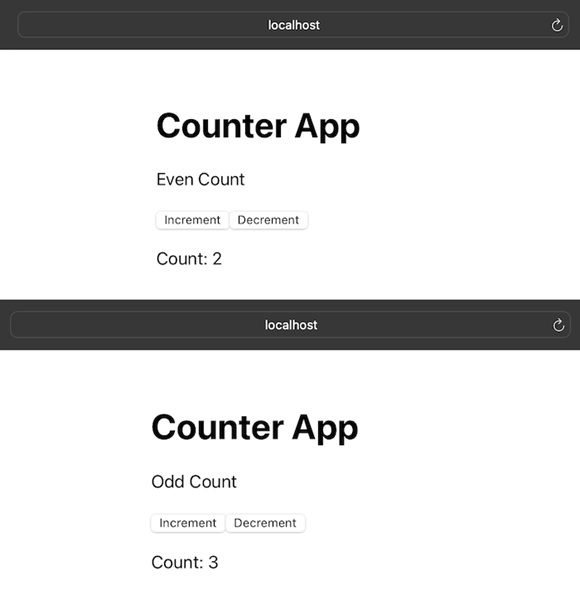
此应用程序是一个简单的计数器应用程序,可以加减计数。有两个按钮:一个用于增加计数,一个用于减少计数。程序还会告诉我们当前计数是偶数还是奇数。它通过调用 UNSAFE_componentWillUpdate() 方法根据计数是偶数还是奇数来更新消息。如果我们有偶数,它将显示"偶数计数",如果我们有奇数,它将显示"奇数计数"。
因此,此应用程序的代码如下 −
// CounterApp.js
import React, { Component } from 'react';
import './App.css';

class CounterApp extends Component {
   constructor(props) {
      super(props);
      this.state = {
         count: 0,
         message: '',
      };
   }

   // 使用 UNSAFE_componentWillUpdate() 根据计数值更新消息
   UNSAFE_componentWillUpdate(nextProps, nextState) {
      if (nextState.count !== this.state.count) {
         nextState.message = nextState.count % 2 === 0 ? 'Even Count' : 'Odd Count';
      }
   }
   handleIncrement = () => {
      this.setState((prevState) => ({ count: prevState.count + 1 }));
   };
   handleDecrement = () => {
      this.setState((prevState) => ({ count: prevState.count - 1 }));
   };

   render() {
      return (
         <div className='App'>
            <h1>Counter App</h1>
            <p>{this.state.message}</p>
            <button onClick={this.handleIncrement}>Increment</button>
            <button onClick={this.handleDecrement}>Decrement</button>
            <p>Count: {this.state.count}</p>
         </div>
      );
   }
}

export default CounterApp;
输出
注意
因此,我们可以在如上所示的输出图像中看到,有两个按钮可用:一个用于增加,另一个用于减少。并且根据偶数和奇数计数显示消息。
摘要
UNSAFE_componentWillUpdate() 是一个 React 函数,在组件更新和重新渲染之前不久使用。它让我们有机会为未来的变化做好准备。
 reactjs_reference_api.html
