
ReactJS - useImperativeHandle Hook
useImperativeHandle 是 React 18 中引入的 React Hook。此 Hook 允许我们自定义作为子组件的 ref 公开的句柄。当我们需要立即连接子组件时,这非常有用,这意味着我们想要立即访问和调用子组件上的方法或属性。
语法
useImperativeHandle(ref, createHandle,optional_dependency)
参数
ref − 这是一个帮助我们连接子组件的特殊工具。当我们借助 forwardRef 创建子组件时,它会作为第二个参数接收。
createHandle − 它是一组指令,用于说明我们希望能够对子组件执行的操作。这就是我们从 useImperativeHandle 返回的内容。
可选依赖项 − 我们需要列出我们在 createHandle 部分中使用的所有内容(如 props、state 和变量)。因此,React 将检查这些内容并确保它们不会意外更改。如果发生更改,它将更新我们的特殊工具。
返回值
此方法返回未定义。
如何使用它?
我们可以在组件的顶层使用"useImperativeHandle"来自定义它公开的 ref 句柄 −
import { forwardRef, useImperativeHandle } from 'react';

const MyComp = forwardRef(function MyComp(props, ref) {
   useImperativeHandle(ref, () => {
      return {
         // the methods we want in our code ...
      };
   }, []);
示例
因此,我们可以通过两种不同的方式使用此Hooks(钩子)。首先,创建一个可供父组件使用的自定义 ref 句柄;其次,公开我们自己的命令式方法。我们将进一步逐一讨论这两种方法。
使自定义 ref 句柄可供父组件使用
默认情况下,React 组件不提供对底层 DOM 元素的直接访问。我们必须使用 forwardRef 来允许父组件访问子组件中的 ;input> DOM 节点。
import { forwardRef } from 'react';

const InputComp = forwardRef(function InputComp(props, ref) {
    return <input {...props} ref={ref} />;
});
此代码将返回实际的 <input> DOM 节点给 InputComp 的引用。
有时我们不想暴露完整的 DOM 节点,而只想暴露其部分方法或属性。例如,聚焦和滚动子组件而不暴露整个 DOM 节点。我们可以借助 useImperativeHandle Hooks(钩子)自定义暴露的句柄。
例如
import { forwardRef, useImperativeHandle } from 'react';

const InputComp = forwardRef(function InputComp(props, ref) {
   useImperativeHandle(ref, () => ({
   focus() {
      inputRef.current.focus();
   },
   scrollIntoView() {
      inputRef.current.scrollIntoView();
   },
   }), []);

   return <input {...props} />;
});
在上面的例子中,我们正在修改父组件的公开句柄。InputComp 的 focus 和 scrollIntoView 方法可以由父组件调用。但它无法直接访问 DOM 节点 <input>。
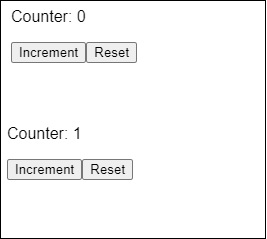
示例 − 简短应用程序以了解此 Hook
import React, { forwardRef, useImperativeHandle, useRef, useState } from 'react';

const Counter = forwardRef(function Counter(props, ref) {
   const [count, setCount] = useState(0);
   const increment = () => {
      setCount(count + 1);
   };
   const reset = () => {
      setCount(0);
   };
   useImperativeHandle(ref, () => ({
      increment,
      reset,
   }), []);
   return (
      <div>
         <p>Counter: {count}</p>
      </div>
   );
});

function App() {
   const counterRef = useRef();
   const handleIncrement = () => {
      counterRef.current.increment();
   };

   const handleReset = () => {
      counterRef.current.reset();
   };

   return (
      <div>
         <Counter ref={counterRef} />
         <button onClick={handleIncrement}>Increment Count</button>
         <button onClick={handleReset}>Reset</button>
      </div>
   );
}
export default App;
输出
示例 − 公开我们自己的命令式方法
在组件中,我们可以创建自己的自定义方法并将它们提供给其父级。这些自定义方法不必与 HTML 元素的内置方法相同。
假设我们有一个 InputForm 组件,它显示一个简单的输入字段组件 (InputForm),当按下按钮时,该组件可以滚动到视图中并获得焦点。当我们单击名为 App 的父组件中的按钮时,将执行输入字段上的此方法,使其滚动到视图中并获得焦点。
import React, { forwardRef, useRef, useImperativeHandle } from 'react';

const InputForm = forwardRef((props, ref) => {
   const inputRef = useRef(null);

   useImperativeHandle(ref, () => ({
      scrollAndFocus() {
         inputRef.current.scrollIntoView();
         inputRef.current.focus();
      }
   }), []);

   return <input type="text" ref={inputRef} placeholder="Type here..." />;
});

function App() {
   const inputRef = useRef();

   const handleButtonClick = () => {
      inputRef.current.scrollAndFocus();
   };

   return (
      <div>
         <button onClick={handleButtonClick}>Scroll and Focus</button>
         <InputForm ref={inputRef} />
      </div>
   );
}

export default App;
在上面的例子中,我们演示了如何使用 forwardRef 和 useImperativeHandle 滚动并聚焦在输入字段上。
总结
在版本 18 中,useImperativeHandle 是一个有用的 React Hook,它允许通过更改 ref 立即与子组件交互。当我们需要快速访问子组件的功能或属性时,它很有用。通过使用这个Hooks(钩子),我们可以创建一个连接并定义我们想要对子组件执行的操作,在需要时提供顺畅的通信和更新,方法返回未定义。
 reactjs_reference_api.html
