
Yii - 资源
资源是可在网页中引用的文件(css、js、视频、音频或图像等)。Yii 以资源包的形式管理资源。资源包的目的是在代码库中拥有一组相关的JS或CSS文件,并能够在单个 PHP 调用中注册它们。资源包还可以依赖于其他资源包。
在资源文件夹中,您将找到基本应用程序模板的资源包 −
<?php
   namespace app\assets;
   use yii\web\AssetBundle;
   /**
   * @author Qiang Xue <qiang.xue@gmail.com>
   * @since 2.0
   */
   class AppAsset extends AssetBundle {
      public $basePath = '@webroot';
      public $baseUrl = '@web';
      public $css = [
         'css/site.css',
      ];
      public $js = [];
      public $depends = [
         'yii\web\YiiAsset',
         'yii\bootstrap\BootstrapAsset',
      ];
   }
?>
上述类指定资源文件位于 @webroot 文件夹内,该文件夹对应于 URL @web。该包不包含 JS 文件,只包含一个 CSS 文件。该包依赖于其他包 −
yii\web\YiiAsset 和 yii\bootstrap\BootstrapAsset。
AssetBundle 的属性
以下是 AssetBundle 的属性。
basePath − 定义一个可通过 Web 访问的目录,其中包含此包中的资源文件。
baseUrl −指定 basePath 属性对应的 URL。
js − 定义此包中包含的 JS 文件的数组。
css − 定义此包中包含的 CSS 文件的数组。
depends − 定义此包所依赖的资源包的数组。这意味着当前资源包的 CSS 和 JS 文件将在 depends 属性声明的包之后包含。
sourcePath − 定义包含资源文件的根目录。如果根目录无法通过 Web 访问,则应设置此属性。否则,您应该设置 basePath 和 baseUrl 属性。
cssOptions − 定义将传递给 yii\web\View←registerCssFile 函数的选项。
jsOptions −定义将传递给 yii\web\View::registerJsFile 函数的选项。
publishOptions:指定将传递给 yii\web\AssetManager::publish 函数的选项。
资产分类
根据位置,资产可归类为 −
源资产 − 资产位于无法通过 Web 直接访问的目录中。应将它们复制到 Web 目录以便在页面中使用源资产。此过程称为 资产发布。
已发布资产 −资产位于可通过 Web 访问的目录中
外部资产 − 资产位于另一台 Web 服务器上。
使用资产包
步骤 1 − 在 assets 文件夹中,创建一个名为 DemoAsset.php 的新文件,其中包含以下内容。
<?php
   namespace app\assets;
   use yii\web\AssetBundle;
   class DemoAsset extends AssetBundle {
      public $basePath = ‘@webroot’;
      public $baseUrl = ‘@web’;
      public $js = [‘js/demo.js’];
   }
?>
步骤 2 − 我们刚刚用单个 demo.js 文件声明了一个新的资源包。现在,在 web/js 文件夹中,使用此代码创建一个名为 demo.js 的文件。
console.log("hello from demo asset");
步骤 3 − 要注册新创建的资源包,请转到 views/layouts 目录,并在 main.php 文件的顶部添加以下行。
\app\assets\DemoAsset::register($this);
步骤 4 −如果您的 Web 浏览器指向 http://localhost:8080/index.php,您应该会看到以下 chrome 控制台输出。
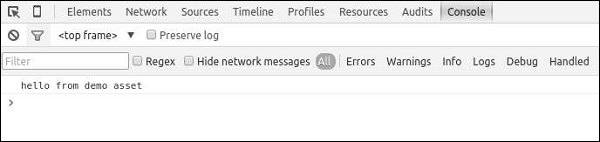
您还可以定义 jsOptions 和 cssOptions 属性来自定义 CSS 和 JS 文件包含在页面中的方式。默认情况下,JS 文件包含在结束 body 标签之前。
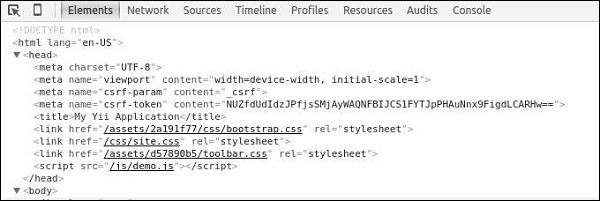
步骤 5 − 要在 head 部分包含 JS 文件,请按以下方式修改 DemoAsset.php 文件。
<?php
   namespace app\assets;
   use yii\web\AssetBundle;
   use yii\web\View;
   class DemoAsset extends AssetBundle {
      public $basePath = '@webroot';
      public $baseUrl = '@web';
      public $js = ['js/demo.js'];
      public  $jsOptions = ['position' => View::POS_HEAD];
   }
?>
步骤 6 − 现在转到 http://localhost:8080/index.php,您应该看到 demo.js 脚本包含在页面的 head 部分中。
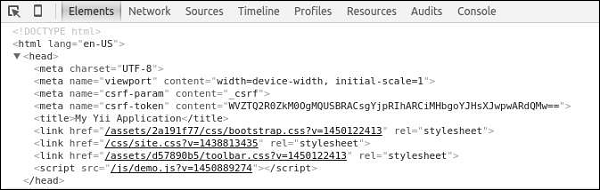
对于在生产模式下运行的 Web 应用程序来说,启用资产的 HTTP 缓存是一种常见的做法。通过这样做,最后修改时间戳将附加到所有已发布的资产。
步骤 7 − 转到 config 文件夹并修改 web.php 文件,如以下代码所示。
<?php
   $params = require(__DIR__ . '/params.php');
   $config = [
      'id' => 'basic',
      'basePath' => dirname(__DIR__),
      'bootstrap' => ['log'],
      'components' => [
         'assetManager' => [
            'appendTimestamp' => true,
         ],
         'request' => [
            // !!! insert a secret key in the following (if it is empty) - this is
               //required by cookie validation
            'cookieValidationKey' => 'ymoaYrebZHa8gURuolioHGlK8fLXCKjO',
         ],
         'cache' => [
            'class' => 'yii\caching\FileCache',
         ],
         'user' => [
            'identityClass' => 'app\models\User',
            'enableAutoLogin' => true,
         ],
         'errorHandler' => [
            'errorAction' => 'site/error',
         ],
         'mailer' => [
            'class' => 'yii\swiftmailer\Mailer',
            // send all mails to a file by default. You have to set
            // 'useFileTransport' to false and configure a transport
            // for the mailer to send real emails.
            'useFileTransport' => true,
         ],
         'log' => [
            'traceLevel' => YII_DEBUG ? 3 : 0,
            'targets' => [
               [
                  'class' => 'yii\log\FileTarget',
                  'levels' => ['error', 'warning'],
               ],
            ],
         ],
         'db' => require(__DIR__ . '/db.php'),
      ],
      'modules' => [
         'hello' => [
            'class' => 'app\modules\hello\Hello',
         ],
      ],
      'params' => $params,
   ];
   if (YII_ENV_DEV) {
      // configuration adjustments for 'dev' environment
      $config['bootstrap'][] = 'debug';
      $config['modules']['debug'] = [
         'class' => 'yii\debug\Module',
      ];
      $config['bootstrap'][] = 'gii';
      $config['modules']['gii'] = [
         'class' => 'yii\gii\Module',
      ];
   }
   return $config;
?>
我们添加了 AssetManager 组件并设置了 appendTimestamp 属性。
步骤 8 − 现在在 Web 浏览器的地址栏中输入 http://localhost:8080/index.php。您会注意到所有资产现在都有一个时间戳,如下图所示。
核心 Yii Assetbundles
以下是核心 Yii Assetbundles。
yii\web\JqueryAsset −包含 jquery.js 文件。
yii\web\YiiAsset − 包含 yii.js 文件,该文件实现了在模块中组织 JS 代码的机制。
yii\bootstrap\BootstrapAsset − 包含来自 Twitter Bootstrap 框架的 CSS 文件。
yii\bootstrap\BootstrapPluginAsset − 包含来自 Twitter Bootstrap 框架的 JS 文件。
yii\jui\JuiAsset − 包含来自 jQuery UI 库的 CSS 和 JS 文件。

