
Yii - 身份验证
验证用户身份的过程称为身份验证。它通常使用用户名和密码来判断用户是否是他所声称的人。
要使用 Yii 身份验证框架,您需要 −
- 配置用户应用程序组件。
- 实现 yii\web\IdentityInterface 接口。
基本应用程序模板带有内置身份验证系统。它使用用户应用程序组件,如以下代码所示 −
<?php
   $params = require(__DIR__ . '/params.php');
   $config = [
      'id' => 'basic',
      'basePath' => dirname(__DIR__),
      'bootstrap' => ['log'],
      'components' => [
         'request' => [
            // !!! insert a secret key in the following (if it is empty) - this
               //is required by cookie validation
            'cookieValidationKey' => 'ymoaYrebZHa8gURuolioHGlK8fLXCKjO',
         ],
         'cache' => [
            'class' => 'yii\caching\FileCache',
         ],
         'user' => [
            'identityClass' => 'app\models\User',
            'enableAutoLogin' => true,
         ],
         //other components...
         'db' => require(__DIR__ . '/db.php'),
      ],
      'modules' => [
         'hello' => [
            'class' => 'app\modules\hello\Hello',
         ],
      ],
      'params' => $params,
   ];
   if (YII_ENV_DEV) {
      // 针对"dev"环境的配置调整
      $config['bootstrap'][] = 'debug';
      $config['modules']['debug'] = [
         'class' => 'yii\debug\Module',
      ];
      $config['bootstrap'][] = 'gii';
      $config['modules']['gii'] = [
         'class' => 'yii\gii\Module',
      ];
   }
   return $config;
?>
在上述配置中,用户的身份类配置为 app\models\User。
身份类必须实现 yii\web\IdentityInterface,并具有以下方法 −
findIdentity() − 使用指定的用户 ID 查找身份类的实例。
findIdentityByAccessToken() − 使用指定的访问令牌查找身份类的实例。
getId() − 返回用户的 ID。
getAuthKey() − 返回用于验证基于 cookie 的登录的密钥。
validateAuthKey() −实现验证基于 cookie 的登录密钥的逻辑。
基本应用程序模板中的 User 模型实现了上述所有功能。用户数据存储在 $users 属性中 −
<?php
   namespace app\models;
   class User extends \yii\base\Object implements \yii\web\IdentityInterface {
      public $id;
      public $username;
      public $password;
      public $authKey;
      public $accessToken;
      private static $users = [
         '100' => [
            'id' => '100',
            'username' => 'admin',
            'password' => 'admin',
            'authKey' => 'test100key',
            'accessToken' => '100-token',
         ],
         '101' => [
            'id' => '101',
            'username' => 'demo',
            'password' => 'demo',
            'authKey' => 'test101key',
            'accessToken' => '101-token',
         ],
      ];
      /**
      * @inheritdoc
      */
      public static function findIdentity($id) {
         return isset(self::$users[$id]) ? new static(self::$users[$id]) : null;
      }
      /**
      * @inheritdoc
      */
      public static function findIdentityByAccessToken($token, $type = null) {
         foreach (self::$users as $user) {
            if ($user['accessToken'] === $token) {
               return new static($user);
            }
         }
         return null;
      }
      /**
      * Finds user by username
      *
      * @param string $username
      * @return static|null
      */
      public static function findByUsername($username) {
         foreach (self::$users as $user) {
            if (strcasecmp($user['username'], $username) === 0) {
               return new static($user);
            }
         }
         return null;
      }
      /**
      * @inheritdoc
      */
      public function getId() {
         return $this->id;
      }
      /**
      * @inheritdoc
      */
      public function getAuthKey() {
         return $this->authKey;
      }
      /**
      * @inheritdoc
      */
      public function validateAuthKey($authKey) {
         return $this->authKey === $authKey;
      }
      /**
      * Validates password
      *
      * @param string $password password to validate
      * @return boolean if password provided is valid for current user
      */
      public function validatePassword($password) {
         return $this->password === $password;
      }
   }
?>
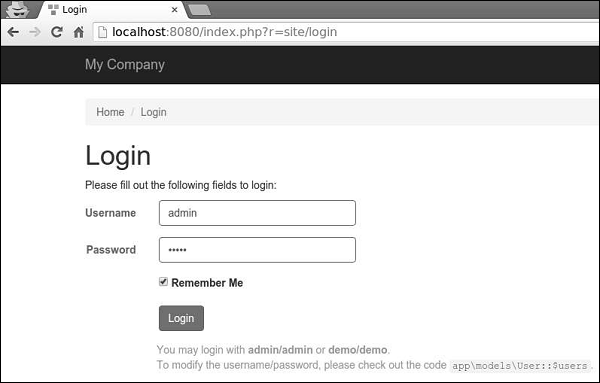
步骤 1 − 转到 URL http://localhost:8080/index.php?r=site/login 并使用管理员登录网站,输入登录名和密码。
步骤 2 − 然后,向 SiteController 添加一个名为 actionAuth() 的新函数。
public function actionAuth(){
    // 当前用户身份。如果用户未通过身份验证,则为 Null。
    $identity = Yii::$app->user->identity;
    var_dump($identity);
    // 当前用户的 ID。如果用户未通过身份验证,则为 Null。
    $id = Yii::$app->user->id;
    var_dump($id);
    // 当前用户是否为访客(未经过身份验证)
    $isGuest = Yii::$app->user->isGuest;
    var_dump($isGuest);
}
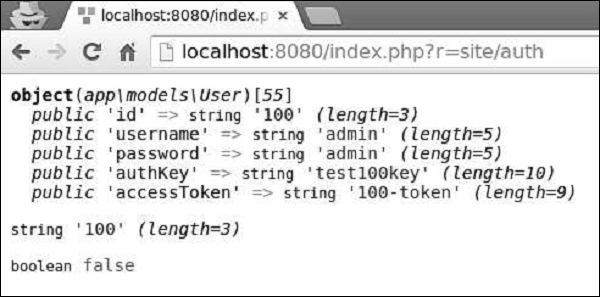
步骤 3 − 在 Web 浏览器中输入地址 http://localhost:8080/index.php?r=site/auth,您将看到有关 admin 用户的详细信息。
步骤 4 − 要登录和注销用户,您可以使用以下代码。
public function actionAuth() {
    // 当前用户是否为访客(未经身份验证)
    var_dump(Yii::$app->user->isGuest);
    // 查找具有指定用户名的用户身份。
    // 请注意,您可能需要在需要时检查密码
    $identity = User::findByUsername("admin");
    // 登录用户
    Yii::$app->user->login($identity);
    // 当前用户是否为访客(未认证)
    var_dump(Yii::$app->user->isGuest);
    Yii::$app->user->logout();
    // 当前用户是否为访客(未认证)
    var_dump(Yii::$app->user->isGuest);
}
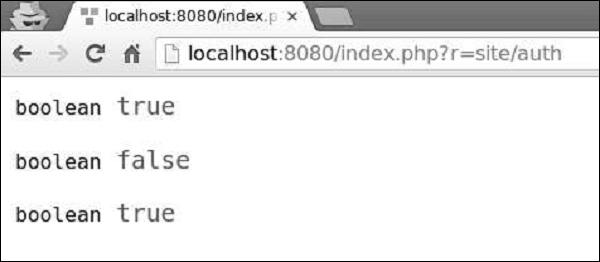
首先,我们检查用户是否已登录。如果值返回 false,则我们通过 Yii::$app → user → login() 调用登录用户,并使用 Yii::$app → user → 注销用户logout() 方法。
步骤 5 − 转到 URL http://localhost:8080/index.php?r=site/auth,您将看到以下内容。
yii\web\User 类引发以下事件 −
EVENT_BEFORE_LOGIN − 在 yii\web\User::login()
开始时引发
EVENT_AFTER_LOGIN −成功登录后引发
EVENT_BEFORE_LOGOUT − 在 yii\web\User::logout()
开始时引发
EVENT_AFTER_LOGOUT − 成功注销后引发

