Yii - 创建行为
假设我们要创建一个行为,将行为所附加到的组件的"name"属性改为大写。
步骤 1 − 在 components 文件夹中,使用以下代码创建一个名为 UppercaseBehavior.php 的文件。
<?php
   namespace app\components;
   use yii\base\Behavior;
   use yii\db\ActiveRecord;
   class UppercaseBehavior extends Behavior {
      public function events() {
         return [
            ActiveRecord::EVENT_BEFORE_VALIDATE => 'beforeValidate',
         ];
      }
      public function beforeValidate($event) {
         $this->owner->name = strtoupper($this->owner->name);
     }
   }
?>
在上面的代码中,我们创建了 UppercaseBehavior,当触发"beforeValidate"事件时,它将 name 属性变为大写。
步骤 2 − 要将此行为附加到 MyUser 模型,请按如下方式修改它。
<?php
   namespace app\models;
   use app\components\UppercaseBehavior;
   use Yii;
   /**
   * This is the model class for table "user".
   *
   * @property integer $id
   * @property string $name
   * @property string $email
   */
   class MyUser extends \yii\db\ActiveRecord {
      public function behaviors() {
         return [
            // anonymous behavior, behavior class name only
            UppercaseBehavior::className(),
         ];
      }
      /**
      * @inheritdoc
      */
      public static function tableName() {
         return 'user';
      }
      /**
      * @inheritdoc
      */
      public function rules() {
         return [
            [['name', 'email'], 'string', 'max' => 255]
         ];
      }
      /**
      * @inheritdoc
      */
      public function attributeLabels() {
         return [
            'id' => 'ID',
            'name' => 'Name',
            'email' => 'Email',
         ];
      }
   }
?>
现在,无论何时我们创建或更新用户,其 name 属性都将采用大写形式。
步骤 3 − 向 SiteController 添加 actionTestBehavior 函数。
public function actionTestBehavior() {
   //creating a new user
   $model = new MyUser();
   $model->name = "John";
   $model->email = "john@gmail.com";
   if($model->save()){
      var_dump(MyUser::find()->asArray()->all());
   }
}
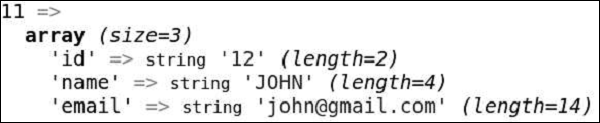
步骤 4 − 在地址栏中输入 http://localhost:8080/index.php?r=site/test-behavior,您将看到新创建的 MyUser 模型的 name 属性是大写的。