
Yii - URL 格式
当 Yii 应用程序处理请求的 URL 时,它首先将 URL 解析为路由。然后,为了处理请求,此路由用于实例化相应的控制器操作。此过程称为 路由。反向过程称为 URL 创建。urlManager 应用程序组件负责路由和 URL 创建。它提供了两种方法 −
parseRequest() − 将请求解析为路由。
createUrl() −从给定的路由创建 URL。
URL 格式
urlManager 应用程序组件支持两种 URL 格式 −
默认格式使用查询参数 r 来表示路由。例如,URL /index.php?r=news/view&id=5 表示路由 news/view 和 id 查询参数 5。
漂亮的 URL 格式使用带有入口脚本名称的额外路径。例如,在前面的示例中,漂亮的格式将是 /index.php/news/view/5。要使用此格式,您需要设置 URL 规则。
要启用漂亮的 URL 格式并隐藏入口脚本名称,请按照以下步骤操作 −
步骤 1 − 按以下方式修改 config/web.php 文件。
<?php
   $params = require(__DIR__ . '/params.php');
   $config = [
      'id' => 'basic',
      'basePath' => dirname(__DIR__),
      'bootstrap' => ['log'],
      'components' => [
         'request' => [
            // !!! insert a secret key in the following (if it is empty) -
               //this is required by cookie validation
            'cookieValidationKey' => 'ymoaYrebZHa8gURuolioHGlK8fLXCKjO',
         ],
         'cache' => [
            'class' => 'yii\caching\FileCache',
         ],
         'user' => [
            'identityClass' => 'app\models\User',
            'enableAutoLogin' => true,
         ],
         'errorHandler' => [
            'errorAction' => 'site/error',
         ],
         'mailer' => [
            'class' => 'yii\swiftmailer\Mailer',
            // send all mails to a file by default. You have to set
            // 'useFileTransport' to false and configure a transport
            // for the mailer to send real emails.
            'useFileTransport' => true,
         ],
         'log' => [
            'traceLevel' => YII_DEBUG ? 3 : 0,
            'targets' => [
               [
                  'class' => 'yii\log\FileTarget',
                  'levels' => ['error', 'warning'],
               ],
            ],
         ],
         'urlManager' => [
            'showScriptName' => false,
            'enablePrettyUrl' => true
         ],
         'db' => require(__DIR__ . '/db.php'),
      ],
      'modules' => [
         'hello' => [
            'class' => 'app\modules\hello\Hello',
         ],
      ],
      'params' => $params,
   ];
   if (YII_ENV_DEV) {
      // configuration adjustments for 'dev' environment
      $config['bootstrap'][] = 'debug';
      $config['modules']['debug'] = [
         'class' => 'yii\debug\Module',
      ];
      $config['bootstrap'][] = 'gii';
      $config['modules']['gii'] = [
         'class' => 'yii\gii\Module',
      ];
   }
   return $config;
?>
我们刚刚启用了 漂亮的 URL 格式,并禁用了入口脚本名称。
步骤 2 − 现在,如果您在 Web 浏览器的地址栏中输入 http://localhost:8080/site/about,您将看到漂亮的 URL 正在运行。
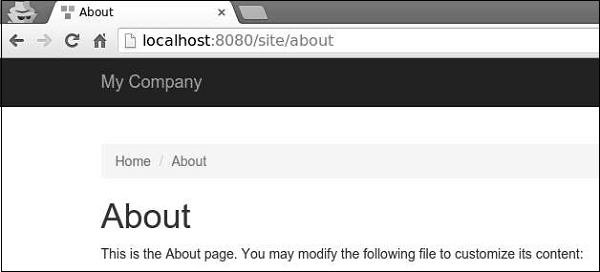
请注意,URL 不再是 http://localhost:8080/index.php?r=site/about。

