Yii - 错误处理
Yii 包含一个内置错误处理程序。Yii 错误处理程序执行以下操作 −
- 将所有非致命 PHP 错误转换为可捕获的异常。
- 显示所有错误和异常以及详细的调用堆栈。
- 支持不同的错误格式。
- 支持使用控制器操作显示错误。
要禁用错误处理程序,您应该在入口脚本中将 YII_ENABLE_ERROR_HANDLER 常量定义为 false。错误处理程序已注册为应用程序组件。
步骤 1 − 您可以按以下方式配置它。
return [
   'components' => [
      'errorHandler' => [
         'maxSourceLines' => 10,
      ],
   ],
];
上述配置将要显示的源代码行数设置为 10。错误处理程序将所有非致命 PHP 错误转换为可捕获的异常。
步骤 2 − 向 SiteController 添加一个名为 actionShowError() 的新函数。
public function actionShowError() {
   try {
      5/0;
   } catch (ErrorException $e) {
      Yii::warning("Ooops...division by zero.");
   }
   // execution continues...
}
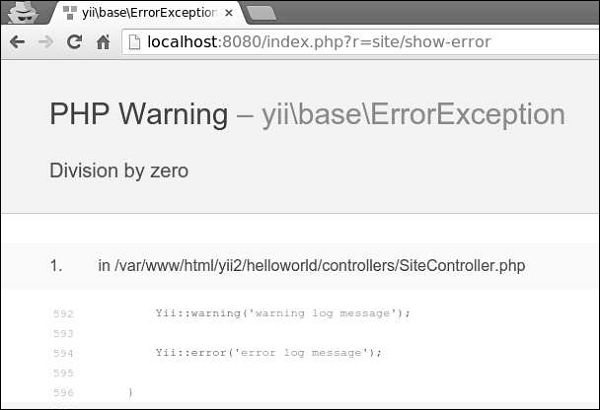
步骤 3 − 转到 URL http://localhost:8080/index.php?r=site/show-error。您将看到一条警告消息。
如果您想向用户显示他的请求无效,您可以抛出 yii\web\NotFoundHttpException。
步骤 4 − 修改 actionShowError() 函数。
public function actionShowError() {
    throw new NotFoundHttpException("Something expected happened");
}
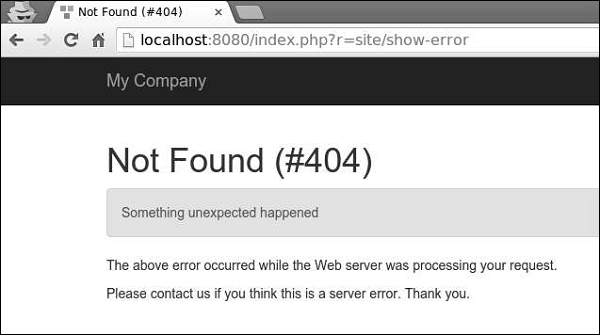
步骤 5 −在地址栏中输入地址 http://localhost:8080/index.php?r=site/show-error。您将看到以下 HTTP 错误。
当 YII_DEBUG 常量为 true 时,错误处理程序将显示错误以及详细的调用堆栈。当常量为 false 时,将仅显示错误消息。默认情况下,错误处理程序使用这些视图显示错误 −
@yii/views/errorHandler/exception.php − 当应使用调用堆栈信息显示错误时,将使用视图文件。
@yii/views/errorHandler/error.php −当需要显示错误而不需要调用堆栈信息时,将使用视图文件。
您可以使用专用的错误操作来自定义错误显示。
步骤 6 − 修改 config/web.php 文件中的 errorHandler 应用程序组件。
<?php
   $params = require(__DIR__ . '/params.php');
   $config = [
      'id' => 'basic',
      'basePath' => dirname(__DIR__),
      'bootstrap' => ['log'],
      'components' => [
         'request' => [
            // !!! insert a secret key in the following (if it is empty) - this
               //is required by cookie validation
            'cookieValidationKey' => 'ymoaYrebZHa8gURuolioHGlK8fLXCKjO',
         ],
         'cache' => [
            'class' => 'yii\caching\FileCache',
         ],
         'user' => [
            'identityClass' => 'app\models\User',
            'enableAutoLogin' => true,
         ],
         'errorHandler' => [
            'errorAction' => 'site/error',
         ],
         //other components...
            'db' => require(__DIR__ . '/db.php'),
      ],
      'modules' => [
         'hello' => [
            'class' => 'app\modules\hello\Hello',
         ],
      ],
      'params' => $params,
   ];
   if (YII_ENV_DEV) {
      // 针对"dev"环境的配置调整
      $config['bootstrap'][] = 'debug';
      $config['modules']['debug'] = [
         'class' => 'yii\debug\Module',
      ];
      $config['bootstrap'][] = 'gii';
      $config['modules']['gii'] = [
         'class' => 'yii\gii\Module',
      ];
   }
   return $config;
?>
上述配置定义了当需要显示错误而不需要调用堆栈时,将执行 site/error 动作。
步骤 7 − 修改 SiteController 的 actions() 方法。
public function actions() {
   return [
      'error' => [
         'class' => 'yii\web\ErrorAction',
      ],
   ];
}
上述代码定义,当发生错误时,将呈现错误视图。
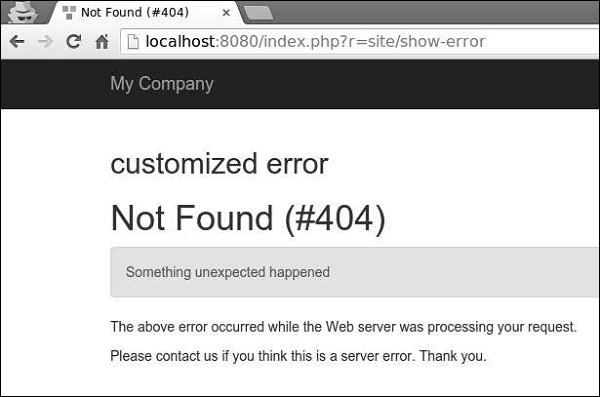
步骤 8 − 在 views/site 目录下创建一个名为 error.php 的文件。
<?php
   /* @var $this yii\web\View */
   /* @var $name string */
   /* @var $message string */
   /* @var $exception Exception */
   use yii\helpers\Html;
   $this->title = $name;
?>

<div class = "site-error">
   <h2>customized error</h2>
   <h1><?= Html::encode($this->title) ?></h1>

   <div class = "alert alert-danger">
      <?= nl2br(Html::encode($message)) ?>
   </div>

   <p>
      The above error occurred while the Web server was processing your request.
   </p>

   <p>
      Please contact us if you think this is a server error. Thank you.
   </p>
</div>
步骤 9 − 访问地址 http://localhost:8080/index.php?r=site/show-error,您将看到自定义的错误视图。