
Yii - 字段
通过重写 fields() 和 extraFields() 方法,您可以定义哪些数据可以放入响应中。这两种方法的区别在于,前者定义默认字段集,这些字段应包含在响应中,而后者定义附加字段,如果最终用户通过 expand 查询参数请求这些字段,则这些字段可能包含在响应中。
步骤 1 − 以这种方式修改 MyUser 模型。
<?php
   namespace app\models;
   use app\components\UppercaseBehavior;
   use Yii;
   /**
   * This is the model class for table "user".
   *@property integer $id
   * @property string $name
   * @property string $email
   */
   class MyUser extends \yii\db\ActiveRecord {
      public function fields() {
         return [
            'id',
            'name',
            //PHP callback
            'datetime' => function($model) {
               return date("d:m:Y H:i:s");
            }
         ];
      }
      /**
      * @inheritdoc
      */
      public static function tableName() {
         return 'user';
      }
      /**
      * @inheritdoc
      */
      public function rules() {
         return [
            [['name', 'email'], 'string', 'max' => 255]
         ];
      }
      /**
      * @inheritdoc
      */
      public function attributeLabels() {
         return [
            'id' => 'ID',
            'name' => 'Name',
            'email' => 'Email',
         ];
      }
   }
?>
除了默认字段:id 和 name,我们还添加了自定义字段 - datetime。
步骤 2 − 在 Postman 中,运行 URL http://localhost:8080/users。
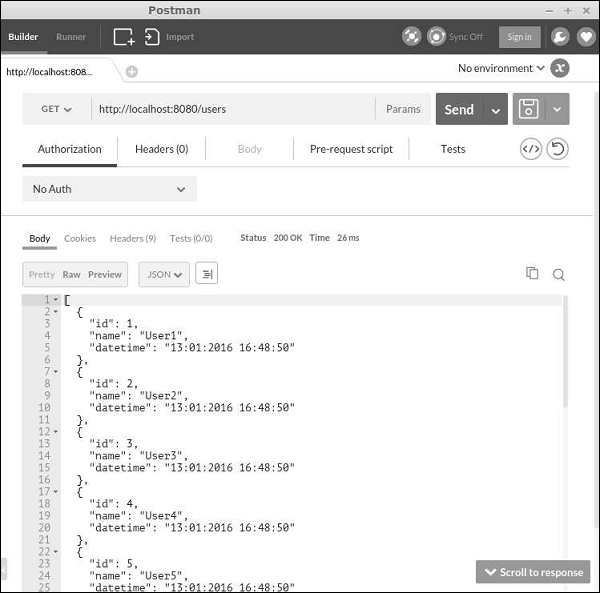
步骤 3 − 现在,以这种方式修改 MyUser 模型。
<?php
   namespace app\models;
   use app\components\UppercaseBehavior;
   use Yii;
   /**
   * This is the model class for table "user".
   *
   * @property integer $id
   * @property string $name
   * @property string $email
   */
   class MyUser extends \yii\db\ActiveRecord {
      public function fields() {
         return [
            'id',
            'name',
         ];
      }
      public function extraFields() {
         return ['email'];
      }
      /**
      * @inheritdoc
      */
      public static function tableName() {
         return 'user';
      }
      /**
      * @inheritdoc
      */
      public function rules() {
         return [
            [['name', 'email'], 'string', 'max' => 255]
         ];
      }
      /**
      * @inheritdoc
      */
      public function attributeLabels() {
         return [
            'id' => 'ID',
            'name' => 'Name',
            'email' => 'Email',
         ];
      }
   }
?>
请注意,电子邮件字段由 extraFields() 方法返回。
步骤 4 − 要获取此字段的数据,请运行 http://localhost:8080/users?expand=email。
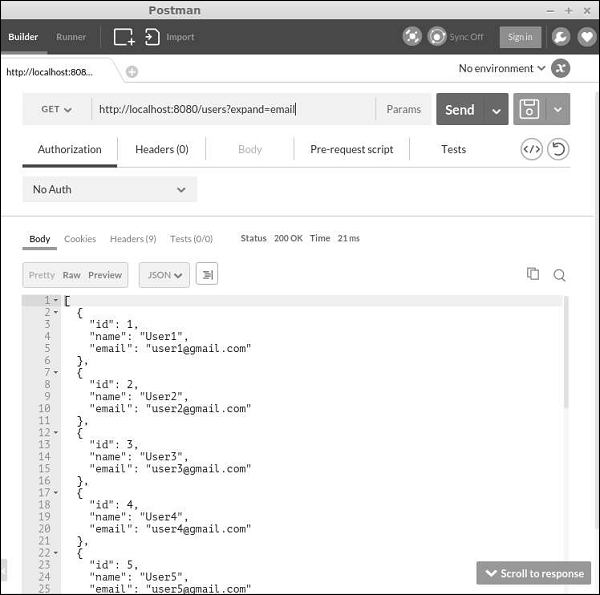
自定义操作
yii est\ActiveController 类提供以下操作 −
Index − 逐页列出资源
View − 返回指定资源的详细信息
Create −创建新资源
Update − 更新现有资源
Delete − 删除指定资源
Options − 返回支持的 HTTP 方法
以上所有操作均在actions方法中声明。
要禁用"删除"和"创建"操作,请按如下方式修改UserController −
<?php
   namespace app\controllers;
   use yii
est\ActiveController;
   class UserController extends ActiveController {
      public $modelClass = 'app\models\MyUser';
      public function actions() {
         $actions = parent::actions();
         // disable the "delete" and "create" actions
         unset($actions['delete'], $actions['create']);
         return $actions;
      }
   }
?>
处理错误
获取 RESTful API 请求时,如果请求中有错误或者服务器上发生了意外情况,您可以简单地抛出异常。如果您可以确定错误的原因,则应该抛出异常以及正确的 HTTP 状态代码。Yii REST 使用以下状态 −
200 − 正常。
201 − 已成功创建资源以响应 POST 请求。Location 标头包含指向新创建资源的 URL。
204 − 请求已成功处理,响应不包含任何内容。
304 −资源未被修改。
400 − 错误请求。
401 − 身份验证失败。
403 − 经过身份验证的用户无权访问指定的 API 端点。
404 − 资源不存在。
405 − 方法不允许。
415 − 不支持的媒体类型。
422 − 数据验证失败。
429 −请求过多。
500 − 内部服务器错误。

