Kivy - 计算器应用程序
在本章中,我们将学习使用 Kivy 库构建计算器应用程序。计算器由每个数字和运算符的按钮组成。它应该有一个带有"="标题的按钮来计算操作,还有一个按钮来清除结果。
让我们从以下设计开始 −
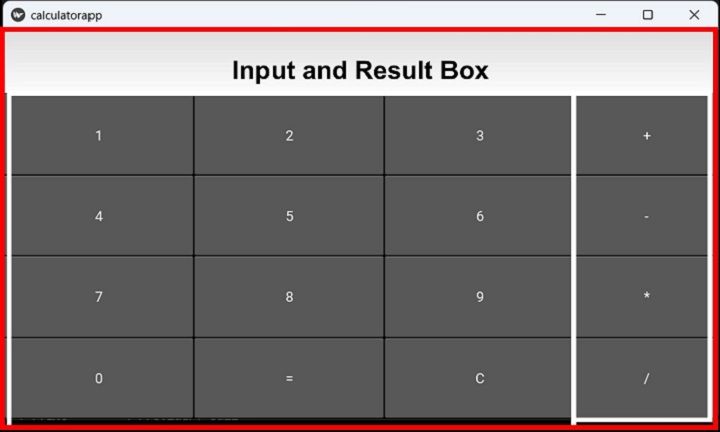
上面的布局在顶部显示一个输入框,后面是 3 列按钮布局,除此之外,四个运算符按钮排列在一列中。
我们将使用一列的顶部网格布局,并添加右对齐的 TextInput,我们将在其下方放置另一个 2 列网格。此网格的左侧单元格包含三列数字、= 和 C 按钮。第二列是所有算术运算符的另一个单列网格。
以下"kv"文件采用了此逻辑 −
<calcy>:
   GridLayout:
      cols:1
      TextInput:
         id:t1
         halign:'right'
         size_hint:1,.2
         font_size:60
      GridLayout:
         cols:2
         GridLayout:
            cols:3
            size:root.width, root.height
            Button:
               id:one
               text:'1'
               on_press:root.onpress(*args)
            Button:
               id:two
               text:'2'
               on_press:root.onpress(*args)
            Button:
               id:thee
               text:'3'
               on_press:root.onpress(*args)
            Button:
               id:four
               text:'4'
               on_press:root.onpress(*args)
            Button:
               id:five
               text:'5'
               on_press:root.onpress(*args)
            Button:
               id:six
               text:'6'
               on_press:root.onpress(*args)
            Button:
               id:seven
               text:'7'
               on_press:root.onpress(*args)
            Button:
               id:eight
               text:'8'
               on_press:root.onpress(*args)
            Button:
               id:nine
               text:'9'
               on_press:root.onpress(*args)
            Button:
               id:zero
               text:'0'
               on_press:root.onpress(*args)
            Button:
               id:eq
               text:'='
               on_press:root.onpress(*args)
            Button:
               id:clr
               text:'C'
               on_press:root.onpress(*args)
      GridLayout:
         cols:1
         size_hint:(.25, root.height)
         Button:
            id:plus
            text:'+'
            on_press:root.onpress(*args)
         Button:
            id:minus
            text:'-'
            on_press:root.onpress(*args)
         Button:
            id:mult
            text:'*'
            on_press:root.onpress(*args)
         Button:
            id:divide
            text:'/'
            on_press:root.onpress(*args)
请注意,每个按钮都与其 on_press 事件上的 onpress() 方法绑定。
onpress() 方法基本上读取按钮标题(其文本属性)并决定操作过程。
如果按钮的标题为数字,则将其附加到 TextInput 框的文本属性。
self.ids.t1.text=self.ids.t1.text+instance.text
如果按钮代表任何算术运算符(+、-、*、/),则当时文本框中的数字将存储在变量中以供进一步操作,并且文本框将被清除。
if instance.text in "+-*/":
self.first=int(self.ids.t1.text)
self.ids.t1.text='0'
self.op=instance.text
如果按钮的text属性为'=',则此时文本框中的数字为第二个操作数。进行适当的算术运算,并将结果显示在文本框中。
if instance.text=='=':
if self.first==0: return
self.second=int(self.ids.t1.text)
if self.op=='+': result=self.first+self.second
if self.op=='-': result=self.first-self.second
if self.op=='*': result=self.first*self.second
if self.op=='/': result=self.first/self.second
self.ids.t1.text=str(result)
self.first=self.second=0
最后,如果按钮的标题为 C,则文本框设置为空。
if instance.text=='C':
self.ids.t1.text=''
self.first=self.second=0
示例
上述"kv"文件在 App 类的 build() 方法中加载。以下是完整代码 −
from kivy.app import App
from kivy.uix.button import Button
from kivy.uix.gridlayout import GridLayout
from kivy.core.window import Window

Window.size = (720,400)

class calcy(GridLayout):
   def __init__(self, **kwargs):
      super(calcy, self).__init__(**kwargs)
      self.first=self.second=0

   def onpress(self, instance):
      if instance.text=='C':
         self.ids.t1.text=''
         self.first=self.second=0
      elif instance.text in "+-*/":
         self.first=int(self.ids.t1.text)
         self.ids.t1.text='0'
         self.op=instance.text

      elif instance.text=='=':
         if self.first==0: return
            self.second=int(self.ids.t1.text)
         if self.op=='+': result=self.first+self.second
         if self.op=='-': result=self.first-self.second
         if self.op=='*': result=self.first*self.second
         if self.op=='/': result=self.first/self.second
         self.ids.t1.text=str(result)
         self.first=self.second=0
      else:
         self.ids.t1.text=self.ids.t1.text+instance.text

class calculatorapp(App):
   def build(self):
      return calcy(cols=3)

calculatorapp().run()
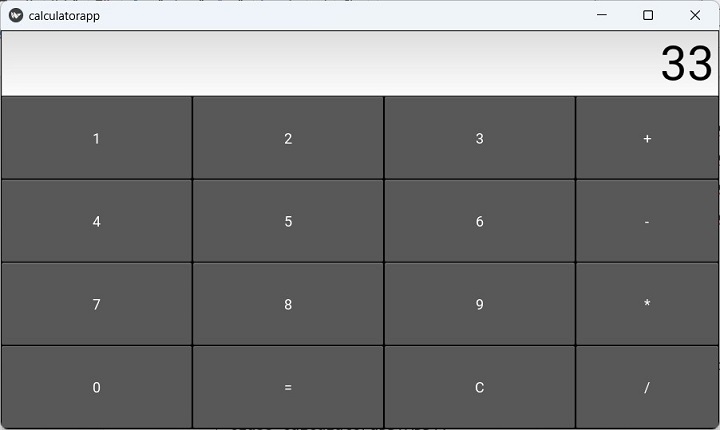
输出
运行上面的程序并使用此应用程序执行所有基本算术计算。