Kivy - 秒表应用程序
在本章中,我们将使用 Python 的 Kivy GUI 框架构建一个秒表应用程序。秒表测量从开始事件到停止事件所用的时间。例如,秒表用于测量运动员完成 100 米跑所用的时间。
应用程序的 GUI 设计应类似于下图 −
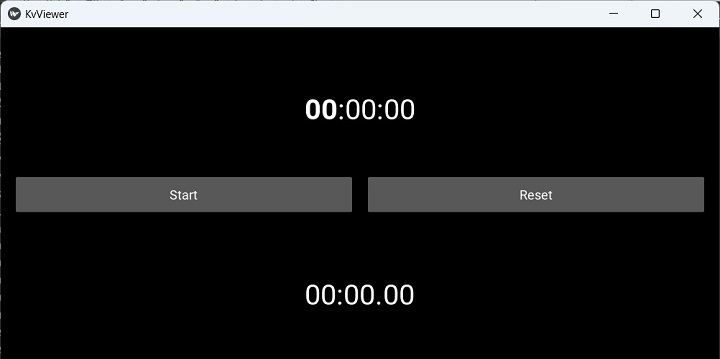
以下"kv"脚本用于放置两个标签和两个按钮,如上图所示。顶部标签将用于显示当前时间,底部标签将显示计时器启动后经过的时间。左侧按钮用于启动/停止秒表。右侧按钮将计时器重置为 0。
BoxLayout:
   orientation: 'vertical'

   Label:
      id: time
      font_size:40
      markup:True
      text: '[b]00[/b]:00:00'

   BoxLayout:
      orientation: 'horizontal'
      padding: 20
      spacing: 20
      height: 90
      size_hint: (1, None)

      Button:
         text: 'Start'
         id: start_stop
         on_press : app.start_stop()

      Button:
         id: reset
         text: 'Reset'
         on_press: app.reset()
   Label:
      id: stopwatch
      font_size:40
      markup:True
      text:'00:00.[size=40]00[/size]'
在应用程序代码中,我们定义了一个 on_stop() 事件处理程序,该处理程序在 GUI 填充后立即调用。它安排一个时间事件处理程序,该处理程序每秒用当前时间更新标签。
def on_start(self):
   Clock.schedule_interval(self.update_time, 0)
如果计时器已启动,update_time() 方法将更新上方标签上显示的当前时间(id 为时间)和下方标签上显示的已用时间(id 为秒表)。
def update_time(self, t):
   if self.sw_started:
      self.sw_seconds += t
   minutes, seconds = divmod(self.sw_seconds, 60)
   part_seconds = seconds * 100 % 100
   self.root.ids.stopwatch.text = "{:2d} : {:2d}.{:2d}".format(int(minutes), int(seconds), int(part_seconds))
   self.root.ids.time.text = strftime('[b]%H[/b]:%M:%S')
id=start 的按钮绑定到 start_stop() 方法,该方法存储秒表的状态(无论它是启动还是停止),并相应地更新启动按钮(id 为 start_stop)的标题。
def start_stop(self):
   self.root.ids.start_stop.text = 'Start' if
self.sw_started else 'Stop'
   self.sw_started = not self.sw_started
右侧的按钮将时间计数器重置为 0,将另一个按钮的标题设置为开始,并将底部标签的标题重置为 0:0.0。
def reset(self):
   if self.sw_started:
      self.root.ids.start_stop.text = 'Start'
      self.sw_started = False
   self.sw_seconds = 0
示例
完整的编码逻辑如下代码所示 −
from time import strftime
from kivy.clock import Clock
from kivy.app import App
from kivy.core.window import Window

Window.size = (720, 400)

class StopWatchApp(App):
   sw_seconds = 0
   sw_started = False

   def update_time(self, t):
      if self.sw_started:
         self.sw_seconds += t
      minutes, seconds = divmod(self.sw_seconds, 60)
      part_seconds = seconds * 100 % 100

      self.root.ids.stopwatch.text = "{:2d} : {:2d}.{:2d}".format(int(minutes), int(seconds), int(part_seconds))
      self.root.ids.time.text = strftime('[b]%H[/b]:%M:%S')

   def on_start(self):
      Clock.schedule_interval(self.update_time, 0)

   def start_stop(self):
      self.root.ids.start_stop.text = 'Start' if self.sw_started else 'Stop'
      self.sw_started = not self.sw_started

   def reset(self):
      if self.sw_started:
         self.root.ids.start_stop.text = 'Start'
         self.sw_started = False
      self.sw_seconds = 0

StopWatchApp().run()
输出
由于上述代码中的 App 类名称为 StopWatchApp,因此其"kv"语言设计脚本必须命名为"StopWatch.kv"并运行该程序。
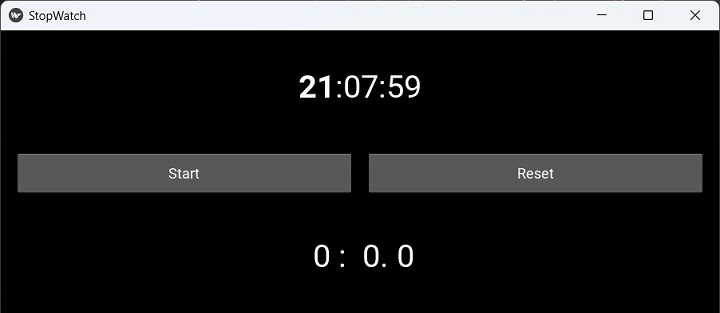
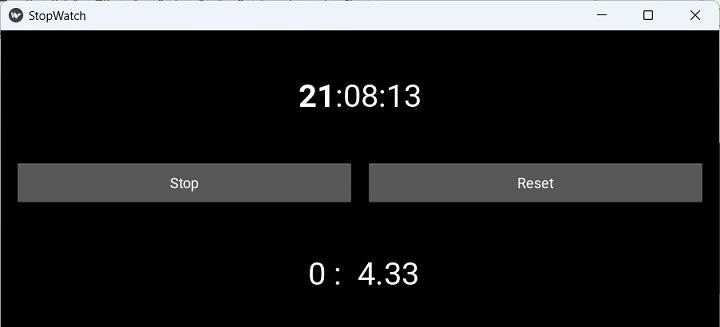
按下"开始"按钮。计数器将启动,并在底部标签上显示经过的时间。标题变为"停止"。再次按下它可停止时钟运行。单击"重置"按钮将标签设置为"0"。