
Kivy - 工具
"kivy.tools"模块包含一些非常有用的脚本、命令行实用程序和示例。
KV 查看器
Kivy 没有任何官方的可视化 GUI 设计器。因此,Kivy 应用程序的布局设计变得乏味,因为在创建"kv"文件时按计划放置小部件,在应用程序中加载时通常不会产生所需的结果。
此 Kv-viewer 实用程序允许您动态显示"kv"文件,并考虑其更改。此实用程序的优点之一是,只有当您对此布局满意时,才可以加载此"kv"脚本。
KViewer 是一个命令行实用程序,需要".kv"文件作为参数。
python kviewer.py demo.kv
示例
以下"kv"文件包含演示应用程序的设计 −
TabbedPanel:
   size_hint: .8, .8
   pos_hint: {'center_x': .5, 'center_y': .5}
   do_default_tab: False
   TabbedPanelItem:
      text:"Register Tab"
      GridLayout:
         cols:2

         Label:
            text:"Name"
            size_hint:(.2, .1)
            pos_hint:{'x':.2, 'y':.75}
         TextInput:
            size_hint:(.4, .1)
            pos_hint:{'x':.3, 'y':.65}

         Label:
            text:"email"
            size_hint:(.2, .1)
            pos_hint:{'x':.2, 'y':.55}

         TextInput:
            size_hint:(.4, .1)
            pos_hint:{'x':.3, 'y':.45}

         Label:
            text:"Password"
            size_hint:(.2, .1)
            pos_hint:{'x':.2, 'y':.35}

         TextInput:
            password:True
            size_hint:(.4, .1)
            pos:(400, 150)
            pos_hint:{'x':.3, 'y':.25}

         Button:
            text:'Submit'
            size_hint : (.2, .1)
            pos_hint : {'center_x':.5, 'center_y':.09}

   TabbedPanelItem:
      text:'Login Tab'
      GridLayout:
         cols:2

         Label:
            text:"email"
            size_hint:(.2, .1)
            pos_hint:{'x':.2, 'y':.55}

         TextInput:
            size_hint:(.4, .1)
            pos_hint:{'x':.3, 'y':.45}

         Label:
            text:"Password"
            size_hint:(.2, .1)
            pos_hint:{'x':.2, 'y':.35}

         TextInput:
            password:True
            size_hint:(.4, .1)
            pos:(400, 150)
            pos_hint:{'x':.3, 'y':.25}

         Button:
            text:'Submit'
            size_hint : (.2, .1)
            pos_hint : {'center_x':.5, 'center_y':.09}
输出
让我们使用 kviewer 实用程序 − 查看设计
python kviewer.py demo.kv
它将生成以下输出窗口 −
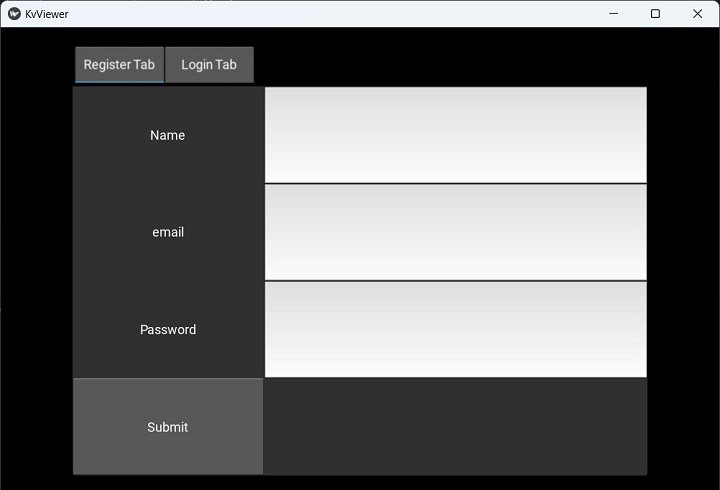
基准
此脚本执行并显示一组基准测试的结果。这些基准测试提供了一组指标,主要用于衡量系统的 OpenGL 性能。
要运行该实用程序,请使用以下命令 −
Python benchmark.py
您将获得以下输出 −
GL Vendor: b'Intel'
GL Renderer: b'Intel(R) Iris(R) Xe Graphics'
GL Version: b'4.6.0 - Build 31.0.101.3959'

Benchmark
---------
1/8 Core: button creation (10000 * 10 a-z) 4.246505
2/8 Core: button creation (10000 * 10 a-z), with Clock.tick [INFO ] [GL    ] NPOT texture support is available
6.612230
3/8 Core: label creation (10000 * 10 a-z) 4.543708
4/8 Core: label creation (10000 * 10 a-z), with Clock.tick 9.790683
5/8 Widget: creation (10000 Widget) 0.308506
6/8 Widget: creation (10000 Widget + 1 root) 1.734984
7/8 Widget: event dispatch (1000 on_update in 10*1000 Widget) 0.088639
8/8 Widget: empty drawing (10000 Widget + 1 root) 0.000706

Result: 27.325960

Do you want to send benchmark to gist.github.com (Y/n) : n
No benchmark posted.
生成图标
此工具将帮助您生成 Google Play Store、App Store、Amazon store 所需的所有图标。
您需要提供要从中生成图标的图像文件的名称,作为 tools 子目录中 generate-icons.py 脚本的参数。
python GPIcon.png
您将获得以下输出 −
Generate App store high resolution: 1024x1024
Generate App store normal resolution: 512x512
Generate iPhone (iOS 7): 120x120
Generate iPhone @2 (iOS 7): 120x120
Generate iPad (iOS 7): 76x76
Generate iPad @2 (iOS 7): 152x152
Generate iPhone (iOS >= 6.1): 57x57
Generate iPhone @2 (iOS >= 6.1): 114x114
Generate iPad (iOS >= 6.1): 72x72
Generate iPad @2 (iOS >= 6.1): 114x114
Generate iTunes Artwork (ad-hoc): 512x512
Generate iTunes Artwork @2 (ad-hoc): 1024x1024
Generate Google Play icon: 512x512
Generate Launcher icon MDPI: 48x48
Generate Launcher icon HDPI: 72x72
Generate Launcher icon XHDPI: 96x96
Generate Launcher icon XXHDPI: 48x48
Generate Launcher icon XXXHDPI: 192x192
Generate Small icon: 114x114
Generate Large icon: 512x512
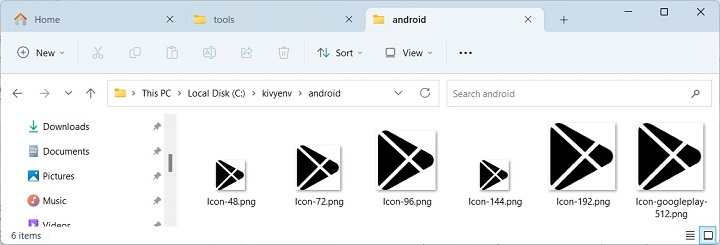
此实用程序生成的图标存储在相应的文件夹中 −
报告工具
此工具是用户的助手。它生成在调试过程中有用的转储信息。
Python report.py
部分输出如下所示 −
==============================================================
Options
==============================================================
window = ('egl_rpi', 'sdl2', 'pygame', 'sdl', 'x11')
text = ('pil', 'sdl2', 'pygame', 'sdlttf')
video = ('gstplayer', 'ffmpeg', 'ffpyplayer', 'null')
audio = ('gstplayer', 'pygame', 'ffpyplayer', 'sdl2', 'avplayer')
image = ('tex', 'imageio', 'dds', 'sdl2', 'pygame', 'pil', 'ffpy', 'gif')
camera = ('opencv', 'gi', 'avfoundation', 'android', 'picamera')
spelling = ('enchant', 'osxappkit')
clipboard = ('android', 'winctypes', 'xsel', 'xclip',
'dbusklipper', 'nspaste', 'sdl2', 'pygame', 'dummy', 'gtk3')

The report will be sent as an anonymous gist.
Do you accept to send report to https://gist.github.com/
(Y/n) : n
No report posted.
Enter any key to leave.

