
Android - RadioGroup 控件
RadioGroup 类用于单选按钮集。
如果我们选中一个属于单选组的单选按钮,它会自动取消选中同一组中任何先前选中的单选按钮。
RadioGroup 属性
以下是与 RadioGroup 控件相关的重要属性。 您可以查看 Android 官方文档以获取完整的属性列表以及可用于更改这些属性的相关方法是运行时。
| 属性 | 描述 |
|---|---|
| android:checkedButton | 这是默认情况下应在此单选组中检查的子单选按钮的 ID。 |
继承自 android.view.View 类 −
| 序号 | 属性 & 描述 |
|---|---|
| 1 | android:background 这是用作背景的可绘制对象。 |
| 2 |
android:contentDescription 这定义了简要描述视图内容的文本。 |
| 3 |
android:id 这为此视图提供了一个标识符名称 |
| 4 |
android:onClick 这是在该视图的上下文中单击视图时要调用的方法的名称。 |
| 5 |
android:visibility 这控制视图的初始可见性。 |
示例
本示例将通过简单的步骤向您展示如何使用线性布局和 RadioGroup 创建您自己的 Android 应用程序。
| 步骤 | 描述 |
|---|---|
| 1 | 您将使用 Android Studio IDE 创建一个 Android 应用程序,并将其命名为 My Application,位于包 com.example.saira_000.myapplication; 下,如 Hello World 示例 一章所述。 |
| 2 | 修改 src/MainActivity.java 文件,添加点击事件。 |
| 2 | 修改 res/layout/activity_main.xml 文件的默认内容以包含 Android UI 控件。 |
| 3 | 无需更改 res/values/strings.xml 中的默认常量,android studio 会处理默认常量。 |
| 4 | 运行应用程序以启动 Android 模拟器并验证应用程序中所做更改的结果。 |
以下是修改后的主活动文件 src/MainActivity.java 的内容。 该文件可以包含每个基本生命周期方法。
在下面的例子中 abc 表示 tutorialspoint 的图像
package com.example.saira_000.myapplication;

import android.app.Activity;
import android.support.v7.app.ActionBarActivity;
import android.os.Bundle;
import android.view.Menu;
import android.view.MenuItem;
import android.view.View;
import android.widget.Button;
import android.widget.RadioButton;
import android.widget.RadioGroup;
import android.widget.Toast;

public class MainActivity extends Activity {
   private RadioGroup radioSexGroup;
   private RadioButton radioSexButton;
   private Button btnDisplay;

   @Override
   protected void onCreate(Bundle savedInstanceState) {
      super.onCreate(savedInstanceState);
      setContentView(R.layout.activity_main);
      radioSexGroup=(RadioGroup)findViewById(R.id.radioGroup);

      btnDisplay=(Button)findViewById(R.id.button);

      btnDisplay.setOnClickListener(new View.OnClickListener() {
         @Override
         public void onClick(View v) {
            int selectedId=radioSexGroup.getCheckedRadioButtonId();
            radioSexButton=(RadioButton)findViewById(selectedId);
            Toast.makeText(MainActivity.this,radioSexButton.getText(),Toast.LENGTH_SHORT).show();
         }
      });
   }
}
以下是 res/layout/activity_main.xml 文件的内容 −
<?xml version="1.0" encoding="utf-8"?>
<RelativeLayout xmlns:android="http://schemas.android.com/apk/res/android"
   xmlns:tools="http://schemas.android.com/tools"
   android:layout_width="match_parent"
   android:layout_height="match_parent"
   android:paddingLeft="@dimen/activity_horizontal_margin"
   android:paddingRight="@dimen/activity_horizontal_margin"
   android:paddingTop="@dimen/activity_vertical_margin"
   android:paddingBottom="@dimen/activity_vertical_margin"
   tools:context=".MainActivity">

   <TextView
      android:layout_width="wrap_content"
      android:layout_height="wrap_content"
      android:text="Radio button"
      android:id="@+id/textView"
      android:layout_alignParentTop="true"
      android:layout_centerHorizontal="true"
      android:textSize="35dp" />

   <TextView
      android:layout_width="wrap_content"
      android:layout_height="wrap_content"
      android:text="Tutorialspoint"
      android:id="@+id/textView2"
      android:layout_below="@+id/textView"
      android:layout_alignRight="@+id/textView"
      android:layout_alignEnd="@+id/textView"
      android:textSize="35dp"
      android:textColor="@android:color/holo_green_dark" />

   <ImageView
      android:layout_width="wrap_content"
      android:layout_height="wrap_content"
      android:id="@+id/imageView"
      android:src="@drawable/abc"
      android:layout_below="@+id/textView2"
      android:layout_alignLeft="@+id/textView"
      android:layout_alignStart="@+id/textView"
      android:layout_alignRight="@+id/textView"
      android:layout_alignEnd="@+id/textView" />

   <RadioGroup
      android:layout_width="fill_parent"
      android:layout_height="90dp"
      android:layout_below="@+id/imageView"
      android:layout_marginTop="58dp"
      android:weightSum="1"
      android:id="@+id/radioGroup"
      android:layout_alignLeft="@+id/textView2"
      android:layout_alignStart="@+id/textView2"
      android:layout_alignRight="@+id/textView3"
      android:layout_alignEnd="@+id/textView3">

      <RadioButton
         android:layout_width="wrap_content"
         android:layout_height="55dp"
         android:text="Male"
         android:id="@+id/radioButton"
         android:layout_gravity="center_horizontal"
         android:checked="false"
         android:textSize="25dp" />

      <RadioButton
         android:layout_width="wrap_content"
         android:layout_height="wrap_content"
         android:text="Female"
         android:id="@+id/radioButton2"
         android:layout_gravity="center_horizontal"
         android:checked="false"
         android:textSize="25dp"
         android:layout_weight="0.13" />
   </RadioGroup>

   <TextView
      android:layout_width="wrap_content"
      android:layout_height="wrap_content"
      android:text="    Are you?"
      android:id="@+id/textView3"
      android:textSize="35dp"
      android:layout_below="@+id/imageView"
      android:layout_alignRight="@+id/textView2"
      android:layout_alignEnd="@+id/textView2"
      android:layout_alignLeft="@+id/imageView"
      android:layout_alignStart="@+id/imageView" />

   <Button
      android:layout_width="wrap_content"
      android:layout_height="wrap_content"
      android:text="New Button"
      android:id="@+id/button"
      android:layout_gravity="center_horizontal"
      android:layout_below="@+id/radioGroup"
      android:layout_centerHorizontal="true" />

</RelativeLayout>
以下将是定义这些新常量的 res/values/strings.xml 的内容 −
<?xml version="1.0" encoding="utf-8"?>
<resources>
   <string name="app_name">My Applicaiton</string>
   <string name="example_radiogroup">Example showing RadioGroup</string>
</resources>
以下是 AndroidManifest.xml 的默认内容 −
<?xml version="1.0" encoding="utf-8"?>
<manifest xmlns:android="http://schemas.android.com/apk/res/android"
   package="com.example.saira_000.myapplication" >

   <application
      android:allowBackup="true"
      android:icon="@drawable/ic_launcher"
      android:label="@string/app_name"
      android:theme="@style/AppTheme" >

      <activity
         android:name="com.example.My Application.MainActivity"
         android:label="@string/app_name" >

         <intent-filter>
            <action android:name="android.intent.action.MAIN" />
            <category android:name="android.intent.category.LAUNCHER" />
         </intent-filter>

      </activity>

   </application>
</manifest>
让我们尝试运行您的 My Application 应用程序。 我假设您在进行环境设置时已经创建了 AVD。 要从 Android Studio 运行应用程序,请打开项目的活动文件之一,然后单击工具栏中的 Run  图标。 Android Studio 在您的 AVD 上安装应用程序并启动它,如果您的设置和应用程序一切正常,它将显示以下 Emulator 窗口 −
将出现以下屏幕,这里我们有一个 RadioGroup。
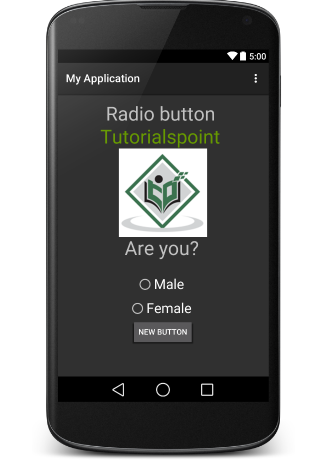
需要选择 "male" 或 "female" 单选按钮,然后单击新按钮。 如果您没有失败地执行上述步骤,则单击新按钮后会收到一条 toast 消息
练习
我建议在 Layout XML 文件中使用不同属性的 RadioButton 以及在编程时尝试上面的示例,以获得 RadioButton 的不同外观。 尝试使其可编辑,更改字体颜色、字体系列、宽度、textSize 等并查看结果。 您还可以在一个活动中尝试使用多个 RadioButton 控件的上述示例。

